Conversation Intelligence in Salesloft brings AI-powered call recording, transcription, and analysis directly into the Salesloft platform. It exists to close the gap between conversation data and sales execution, so the insights from a call can immediately power the rest of a rep's workflow instead of living in a separate tool.
Admins and end users both interact with the product, with admins handling setup and provisioning and end users accessing conversation data inside the Salesloft surfaces they already use. Once configured, users sign in once and access both Salesloft and Conversation Intelligence from a single, unified navigation experience — no separate login required.
|
Feature
|
What It Does
|
Who It's For
|
User Goal
|
|
Automatic Recording & Transcription
|
Bot joins eligible meetings automatically; calls are recorded, transcribed, and available within minutes of ending
|
Sellers, Managers
|
Capture every conversation without manual effort
|
|
AI Call Summaries (Smart Summaries)
|
Every call over 5 minutes gets a concise AI-generated overview of key discussion points, decisions, and next steps
|
Sellers, Managers
|
Review what happened on a call without watching the full recording
|
|
Action Items & Revenue Critical Moments
|
AI extracts follow-up tasks and highlights key moments — pricing conversations, objections, buying signals
|
Sellers, Managers
|
Act on the most important parts of a call immediately
|
|
Smart Chapters
|
Calls are automatically divided into chapters by topic for structured navigation
|
Sellers, Managers
|
Jump to the relevant part of a call without scrubbing
|
|
Activity Feed
|
Call recordings and AI summaries surface directly in Person and Account Activity Feeds
|
Sellers
|
See call history in context of a contact or account
|
|
Ask Salesloft
|
Natural-language Q&A against any call transcript — "What objections came up?"
|
Sellers, Managers
|
Get answers from call data without reviewing the recording
|
|
Real-Time In-Call Features
|
Battlecards, Monologue Alerts, and Bookmarks delivered via desktop app during live calls
|
Sellers
|
Stay on message and flag key moments mid-call
|
|
Coaching Tools
|
Timestamped comments, custom scorecards, and AI-assisted auto-scoring on call recordings
|
Managers
|
Review and develop rep performance at scale
|
|
Topics & Filters
|
Admin-configured keywords tracked across all calls for filtering and analysis
|
Admins, Managers
|
Analyze what's being discussed across the team
|
|
Meeting Prep Agent
|
Pre-meeting brief built using insights from recent calls
|
Sellers
|
Walk into every meeting informed
|
|
Research Agent
|
Background research on a contact or account informed by recent call history
|
Sellers
|
Understand a buyer's context before engaging
|
|
Meeting Follow-Up Agent
|
Automatically drafts a follow-up email with action items pulled from the call
|
Sellers
|
Get follow-ups out fast without starting from scratch
|
|
Buyer Group Agent
|
Identifies the right buyer group contacts using engagement signals from recent calls
|
Sellers
|
Build the right buying committee faster
|
|
Deal Summary Agent
|
Summarizes deal health, risks, and gaps using call transcript data alongside CRM data
|
Managers
|
Get a full picture of deal status without manual synthesis
|
|
Salesforce Integration
|
Call data, AI summaries, action items, and Revenue Critical Moments sync automatically to associated Salesforce records
|
Sellers, Managers
|
Keep CRM records current without manual data entry
|
Conversation Intelligence in Salesloft requires both a Salesloft subscription and a Clari Copilot subscription, with the Conversation Intelligence integration included in the contract. An admin must enable Team Access under Settings > Conversation Intelligence > Team Access before the integration becomes available to users.
Any Salesloft license package that previously included Conversations is eligible — at this time, that includes Advanced and higher tiers.
User provisioning is automatic. Once Team Access is enabled, a user is provisioned into Conversation Intelligence when three conditions are met: they exist as an active Salesloft user, their license tier entitles them to Conversation Intelligence, and Team Access is enabled for their team. These conditions can be satisfied in any order; provisioning resolves automatically once all three are met.
Things to Note: Conversation Intelligence in Salesloft applies to new implementations as of July 2026.
Roles and Permissions
Role
|
What they can do
|
|---|
|
Admin
|
Enables Team Access under Settings > Conversation Intelligence > Team Access, which makes Conversation Intelligence available to eligible users on the team. Admins also have access to User Management, Integration, Coaching, and Topics settings within the Conversation Intelligence settings section.
|
|
End User
|
Captures call and meeting data using Conversation Intelligence. Accesses call recordings, transcripts, and AI insights inside familiar Salesloft surfaces — Activity Feed, Ask Salesloft, Deal Summary, and others — without a separate login. Standard users see only their own Conversation Intelligence profile settings; admin sections are not visible.
|
To get started, contact your professional services team or support representatives.
Primary access path: Once Team Access is enabled for your team and you are provisioned, Conversation Intelligence appears as a tab within the Activity section of the Salesloft top navigation. Hover over Activity > Conversation Intelligence to load the Conversation Intelligence experience directly.
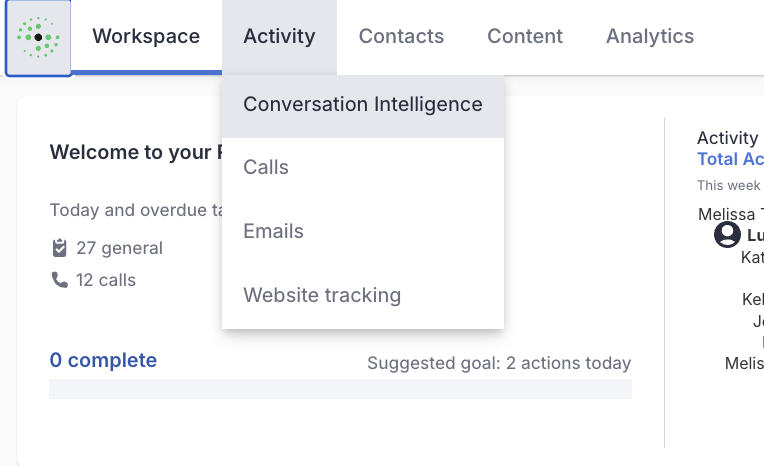
Figure 1: Access Conversation Intelligence from the Salesloft top nav
Conversation Intelligence Settings - Admin: From the top navigation in Salesloft, select your initials in the upper right corner. From the dropdown menu, select Settings > Conversation Intelligence. Admins see Team Access, User Management, Integration, Coaching, and Topics. Standard users see only their own profile settings — admin sections are not visible and cannot be accessed directly via URL.
Conversation Intelligence Settings - Users: From the top navigation in Salesloft, select your initials in the upper right corner. From the dropdown menu, select Settings > CI Preferences
Things to Note: Navigation may look different if your organization uses standalone access to Conversation Intelligence. This article reflects the Salesloft platform experience.
|
Term
|
Definition
|
|---|
|
Conversation Intelligence in Salesloft
|
The integrated experience that brings Clari Copilot call recordings, transcripts, and AI insights into the Salesloft platform, accessible from a single login.
|
|
Salesloft Conversations
|
Salesloft's legacy call recording and conversation intelligence product. Existing Conversations customers are not affected by this release.
|
|
Clari Copilot
|
The underlying conversation intelligence product that powers Conversation Intelligence in Salesloft. Clari Copilot handles call recording, transcription, and AI analysis.
|