Dashboards for Revenue Cadences
Dashboards support Revenue Cadences by aggregating insights from across Clari to provide the right data to the right folks at the right time. Simply put, Dashboards are a collection of widgets anchored on Saved Views from across the core applications.
Dashboard Capabilities
Most of the configuration lies within the underlying saved views supporting each widget. The view is where all the filter conditions and other settings reside. However, there are some simple capabilities within the dashboard itself to support the team reviewing the content. Check out this screenshot and follow along with the steps below it.
1. Scope Selection
You can modify the scope on the dashboard and further filter the data within all the widgets on the dashboard to only that person or role in the hierarchy.
2. Pin widgets from dashboard page
You can select which widget to add to the dashboard directly from the dashboard page. Accomplished either from the blank dashboard page or the Add Widget button in upper right corner.
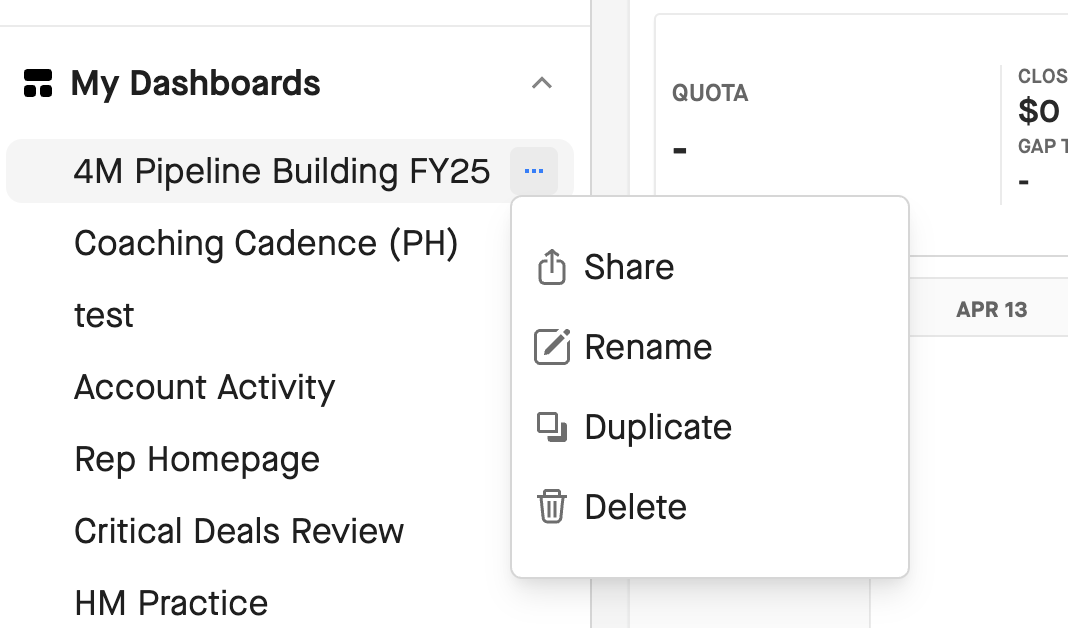
3. More actions
You have additional less commonly used menu options nested within this dropdown.
-
Share: Share the dashboard with others by role or by specific user
-
Rename: Change the name of the dashboard
-
Duplicate: Duplicate the dashboard and customize it further to their needs.