Salesloft's Integrations expand the capabilities of your sales engagement platform.
Our integration partners cover a range of data categories so you can pinpoint and explore the insights and powerful tools you need the most. And the cherry on top of it all? Integrations provide access to some of your favorite apps meaning you don't have to leave your browser to find the information you seek.
In this article, you will find the following instructions and information related to Salesloft Integrations:
Most integrations require authorization between Salesloft and the connected application.
Admins and users with the “Manage and Install Frontend Integrations” permission enabled can see all OAuth applications that are connected to Salesloft and the users that authorized them from the Integrations Settings page.
Integrations are visible in the following sections:
Installed
Uninstalled
Discover Apps
When integrations need to be re-authed or reconnected due to new functionality or a change in your team’s administration, Salesloft admins can manage Installed Integrations to identify which admin owns/connected the app and admins can view which users have access to it.
To manage existing integrations, follow these steps:
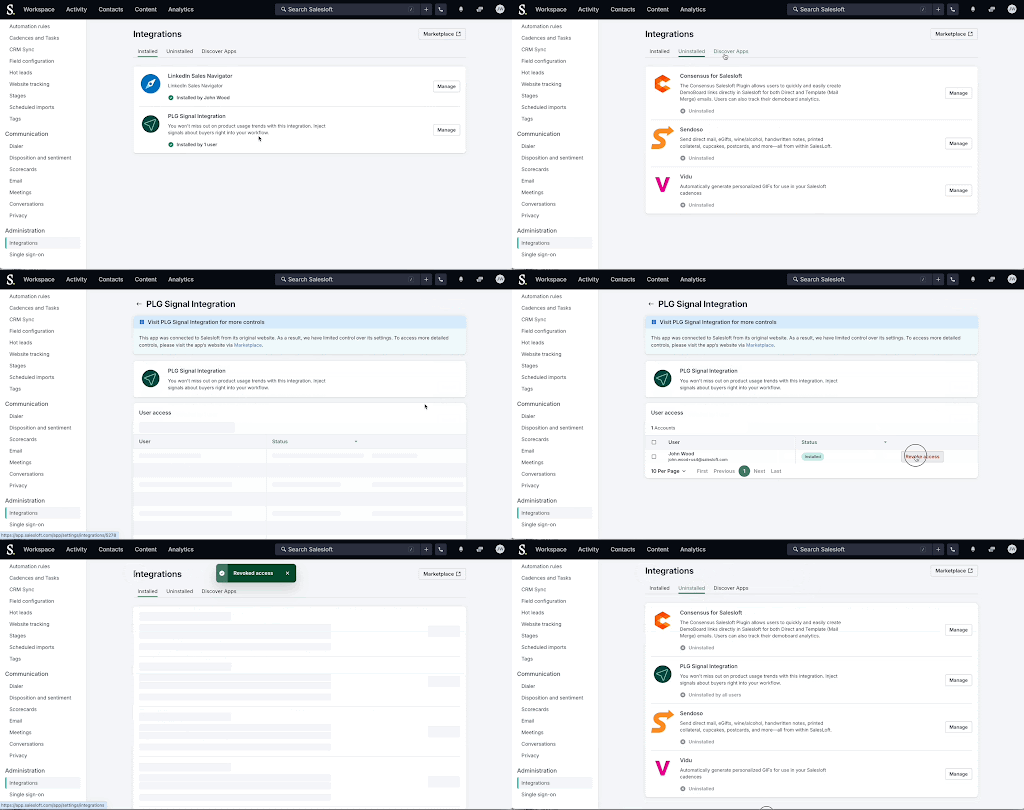
- Navigate to the Integrations inside the Settings. You will land in the Installed tab.
- Find the Integration that needs to be reviewed.
- Click Manage to view users that have authorized the integration.
- Things to Note: Some integrations only require 1 user to authorize the app for the entire team. While others will require individual users to authorize.
- Salesloft Embedded Apps will not show a list of users. Just the Uninstall button
- Click the Revoke button and confirmation screen following to revoke access to the app for that user.
If access has been revoked for all users, the app will be Uninstalled. You can find the app under the Uninstall tab in Integrations.
Each user can confirm their own integrations in their Personal Settings.
Curious to see what apps are available to your team?
Check out the Discover Apps tab inside the Integrations settings for a list of embedded apps.
Click Install next to an integration to authorize the app for your team.
For more information on all of Salesloft's Integrations, check out our App Directory.
Want to add a Salesloft integration? Reach out to partners@salesloft.com to receive a developer license.