The Salesloft package(s) your team purchases impact which features your team can access.
There are currently two types of Salesloft pricing packages:
Since the Salesloft package your team selects determines the features available to you, it’s important to know what each plan includes.
At the top of each Knowledge article, you will see the Package Availability icon. This icon shows which packages include the feature explained in the article. If an X icon is seen next to the package name, the feature is not included in that package.
In this article, we will go over what the different packages contain and answer questions related to package plans and availability, including:
Things to Note: The plans listed in this article are the standard offerings. Features and modules may vary. Please speak to your Salesloft Sales Executive for more information.
All of the Salesloft plans include the following features and capabilities:
*Dialer add on required to make calls using Salesloft Mobile app.
Salesloft Advanced is designed for revenue teams who need to build pipeline and increase their revenue.
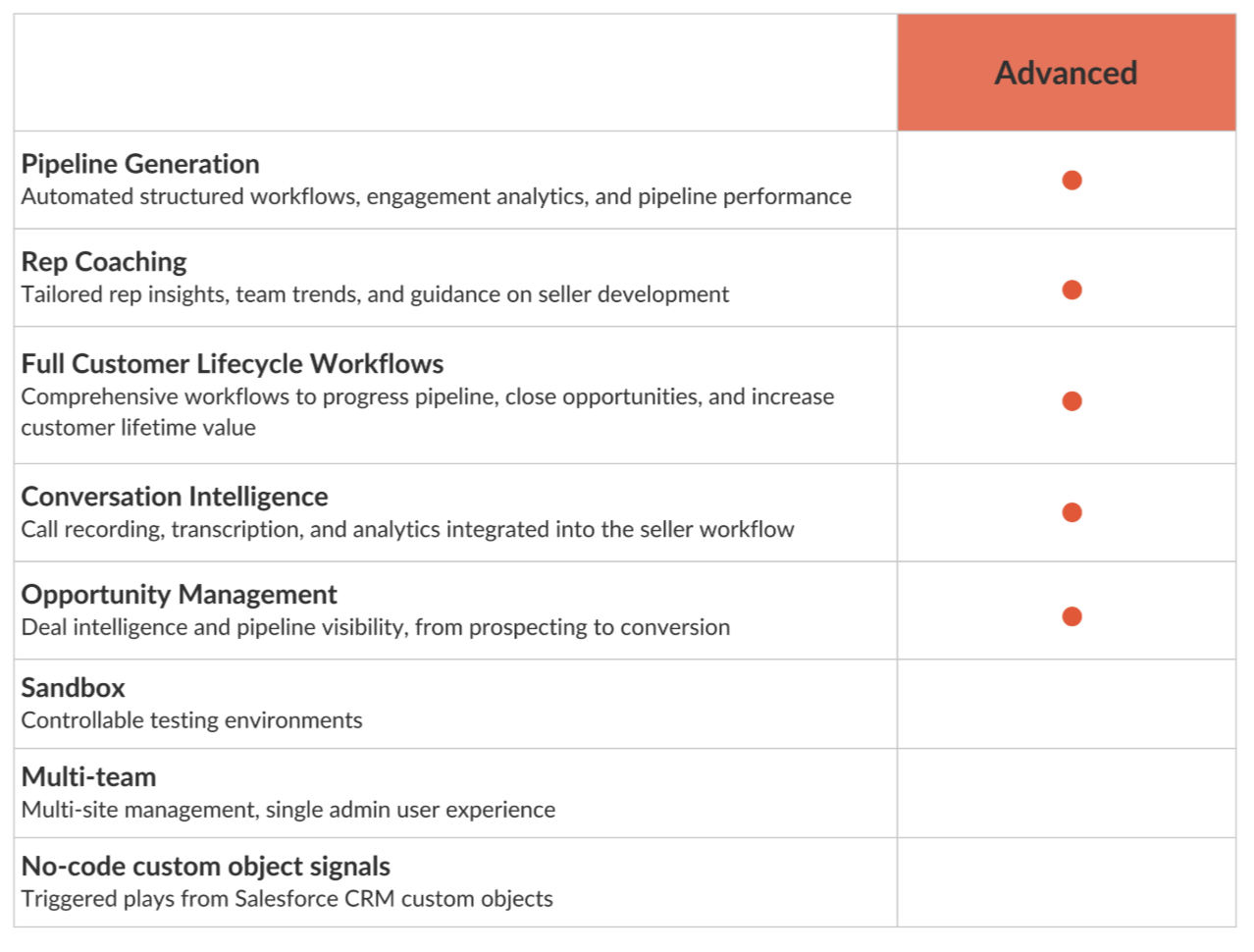
Figure 1: Advanced Package Offering
* Things to Note: Salesloft Deals is only available to customers who use Salesforce as their CRM.
Salesloft Elite is designed for complex organizations and includes differentiated enterprise capabilities such as multi-team, sandbox and CRM signals for custom objects.
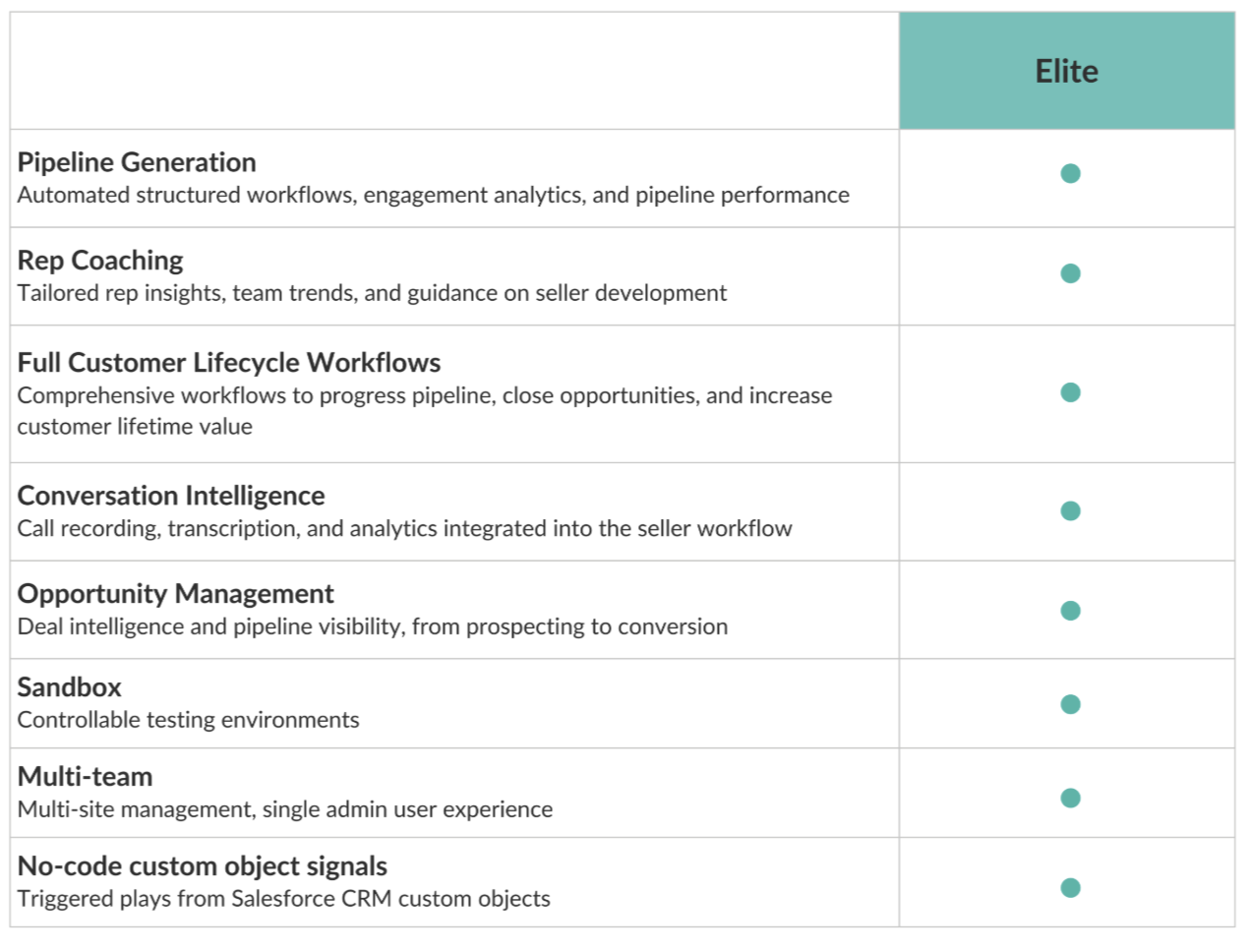
Figure 2: Elite Package Offering
The Forecasting Add-On automates tedious forecasting tasks and provides actionable, AI-driven insights that save your team time, improve forecast accuracy, and proactively guide deals to success.
The Forecasting Add-On can be integrated with any Salesloft package and includes the following powerful features:
- Automatic Forecast Roll-Up and Submission: Say goodbye to manual data compilation. This feature automatically aggregates forecast data, simplifying the submission process and ensuring your numbers are always up-to-date.
- AI-Driven Next Actions: Gain a competitive edge with intelligent recommendations. This AI-powered capability analyzes your forecast data to suggest optimal next steps for your deals, helping your team prioritize and close more effectively.
If you're ready to revolutionize your sales forecasting, contact your Salesloft Account Representative to discuss enabling the Forecasting Add-On for your licenses.
Enhance your Salesloft experience with the Account Agent add-on, which introduces intelligent agents designed to streamline key sales workflows and empower your team. This add-on provides access to powerful AI-driven capabilities that help sellers save time, improve lead quality, and gain deeper insights into their accounts.
The Account Agent add-on can be added to any Salesloft package. It includes the following intelligent agents:
- Buyer Identification Agent: This agent leverages the power of AI and integrations to automatically identify key contacts and buying groups within your target accounts.
- Account Research Agent: This intelligent agent gathers and synthesizes crucial information about both current and prospective companies.
- Person Research Agent: This intelligent agent gathers and synthesizes information about both Person records using Salesloft activities, CRM record data, and conversations.
If you are interested in adding the Account Agent functionality, please contact your Salesloft Account Representative to discuss enabling this add-on for your licenses.
The Coaching Agent Add-On provides intelligent, real-time applications for both sellers and managers. This add-on is specifically designed to add significant value by providing AI agents targeted at an additional, critical point in the revenue lifecycle.
The Coaching Agent Add-On can be integrated with any Salesloft package and includes the following powerful features via the Sales Strategist Agent:
- For Sellers: The agent acts as a constant, intelligent assistant, providing real-time guidance and strategic recommendations to help navigate complex deals and optimize daily selling activities.
- For Managers: The agent provides data-driven insights and coaching opportunities, helping managers pinpoint areas for team improvement and efficiently elevate overall performance.
If you’re ready to revolutionize how your team strategizes and executes, contact your Salesloft Account Representative to discuss enabling the Coaching Agent Add-On for your licenses.
Teams have the option to purchase the Salesloft Dialer as an add-on to any package they purchase.
For more information on the available Dialer add-ons, check out our Dialer Pricing Guide.
If you would like to include the Salesloft Dialer for your team, Contact your Salesloft Account Representative to discuss updating your team’s licenses.
Will I lose access to any features after transitioning from Essentials, Premier, Prospect, or Enterprise?
You will retain core Salesloft functionalities, and gain access to Salesloft Conversations and Deals surface areas. Review the details of the Advanced and Premier packages to ensure you're selecting the one that meets your team’s needs.
For help transitioning, check out the Moving from Salesloft Essentials to Salesloft Advanced article.
How can I check which package I'm currently on?
You can confirm your current plan by checking the Plan Licenses found on the Users Settings page. From this page you can assign license types to the users on your team as well.
Things to Note: Former license types including Essentials and Prospect will be represented as Legacy on the User Management page.
If you would like to review your contract, reach out to your Salesloft Success Manager.
What should I do if I want to upgrade to a new plan?
To upgrade your package, please contact your Salesloft Success Manager or Account Representative. They will guide you through the transition.
Can I still use the Conversations trial if I was on Essentials?
No, the Conversations trial is no longer offered under the new packaging. You now have full access to Conversations through the Advanced and Premier packages.
For further questions, reach out to your Salesloft Success Manager for assistance with the transition and to ensure you are getting the most out of the available features.
Does Salesloft Offer a Testing Environment?
Salesloft Testing Environments allow Salesloft Customers to perform testing in a non-production Salesloft Team at no risk of impacting their Production Team.
Things to Note: Testing Environments can only be provisioned for Salesloft Customers.
If you and your team are interested in purchasing a Salesloft Testing Environment, please contact your Account Manager or CSM.
Salesloft's Legacy packages were available from February 2020 through August 2025.
The previous package options included:
- Premiere
- Prospect
- Sell
- Engage
- Enterprise
- Essentials Package
- Conversations Trials
These packages are no longer available for sale. If you are an existing customer on a legacy pricing plan and would like to learn more, check out the package availability below and reach out to your Salesloft Success Manager.
For existing customers still assigned to our legacy packages, you can learn more about what each package contains in the sections below.
Premier Package
Salesloft Premier is ideal for organizations who need to increase revenue, reduce cost, and drive predictability.
This package offers all of Salesloft's functionalities, including Cadence, Coaching, Conversations, Deals, and Forecast.
* Things to Note: Salesloft Forecast is only available to customers who use Salesforce as their CRM.
Essentials PackageSalesloft Essentials is ideal for sales organizations who need to sustain and scale their pipeline and teams.
This package offers Salesloft's Cadence and Coaching functionalities. In addition, teams assigned with the Essentials package are granted access to a trial edition of Salesloft Conversations.
Conversations Trial
The Essentials package comes with a trial of the full Conversations experience.
The default trial includes 20 conference recordings per user for the first 6 months of use. The trial begins on the day the user becomes active with an Essentials License.
Things to Note: Existing Salesloft customers transitioning to the Essentials package will have 20 recordings for the next 6 months for their trial.
Once your Conversations trial has ended (after 6 months of use or when the user collectively reaches 20 recordings), the Conversations page will inform you that your team's trial has ended.
Things to Note: After your trial, you may access recordings from linked Salesloft objects (account pages, person pages) and in Coaching.
The previous package options included:
- Prospect
- Sell
- Engage
- Enterprise
- Essentials Package
- Conversations Trials
These packages are no longer available for sale. If you are an existing customer on a legacy pricing plan and would like to learn more, check out the package availability below and reach out to your Salesloft Success Manager.
For existing customers still assigned to our legacy packages, you can learn more about what each package contains in the sections below.
Prospect
The Prospect package is ideal for teams responsible for building pipeline. The package contains the following features:
Sell
The Sell package is designed for teams responsible for closing deals. The package contains the following features:
Engage
The Engage package is for teams responsible for managing and growing customer relationships. The package contains the following:
Enterprise
The Enterprise package is for teams involved in every stage of the revenue lifecycle. This package contains everything Salesloft has to offer. See the chart below for the complete breakdown of features.
Essentials Package