Identifying and logging the key stakeholders of a deal is a crucial part of knowing who needs to be engaged to move an opportunity from open to closed (won). For many reps, finding stakeholder contact information and adding contacts to a list is a tedious activity that takes away from selling time.
Fortunately, Salesloft takes care of this by automatically identifying and adding the appropriate people you've engaged with to an opportunity using Auto Buying Group Capture.
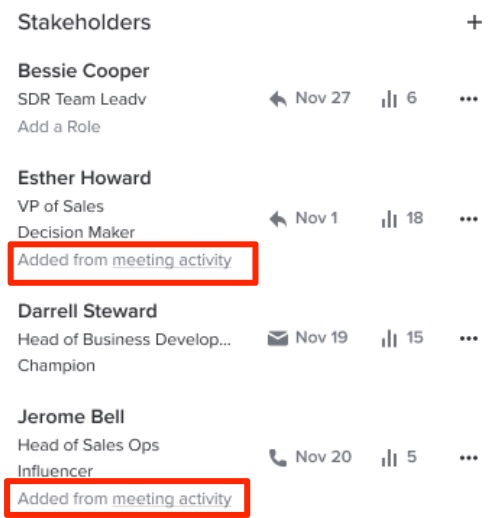
Auto Buying Group Capture identifies Salesloft Person Records related, also known as stakeholders, to opportunities based on emails and meetings. When people have been identified, they are automatically associated with the Deal as a stakeholder. Stakeholders that are added to a Deal using Auto Buying Group Capute will be indicated by a label inside the Buying Group Panel.
In this article, you will learn about Auto Buying Group Capture, including:
- Auto Buying Group Capture is enabled by default.
- The “Primary” Stakeholder is determined by the CRM.
- Stakeholders added via auto buying group will not be automatically created as Contact Roles in Salesforce. The user must choose to add the person as a Contact Role for this to sync to Salesforce.
- Salesloft will attempt to link People records we create to existing Contacts and Leads in the connected CRM in this slide.
Auto Buying Group Capture will detect which people you engage with that should be included as Stakeholders on a deal. For the purposes of Auto Buying Group Capture, Stakeholders include:
- A Salesloft Person who is related to an opportunity due to association with a Salesloft activity (meeting or email)
- A CRM-ingested Opportunity Contact record in the CRM if it exists.
The Stakeholder will be associated with all open opportunities, unless we know more. Specifically, if one of the following rules applies to the stakeholder:
- Is associated with no Opportunities or Accounts, we leverage information from other participants in the activity. Below we outline our decision tree.
As mentioned above, a Stakeholder will be automatically assigned to all open opportunities, unless more information is available.
Let’s walk through possible scenarios that may lead to Auto Buying Group Capture assigning a Stakeholder in different ways. For our example, we will review the various behaviors for an email sent to four people:
Scenario 1
Bob is related to Account1 with 3 open opportunities.
Amy, Terry, and Joy are not related to any Accounts today.
In this situation we will add Bob, Amy, Terry, and Joy as stakeholders on all three open opportunities
Scenario 2
Bob and Amy are related to Account1. This Account has 3 open opportunities (opportunities 1, 2, and 3).
Bob is already associated to opportunity 1 as a stakeholder. Amy is already associated to opportunity 2 as a stakeholder.
In this situation, we will keep Bob and Amy associated with their single open opportunity on the account and no one is added to opportunity 3.
Terry is related to a different Account, Account 2, and this Account has 2 open opportunities (opportunities 4, 5). Terry is not currently listed as a stakeholder on either open deal and so we will add him as a stakeholder to both opportunity 4 and 5.
Joy is not related to Account 1 or 2 and is not a stakeholder on any deal. We will add Joy to all 5 open opportunities for the two accounts based on the shared email activity but Joy will not be added to the account itself.
Scenario 3
Bob is related to Account1 and this account has 0 open opportunities on it. We will not associate Bob to any open deals.
Amy is related to Account2 and this account has 1 open opportunity (Opportunity 1). Amy is already a stakeholder on this opportunity and so we keep her association to Opportunity 1.
Terry and Joy are not currently related to any accounts or opportunities. In this situation we will follow what we did with Amy and add them both to Opportunity 1 as stakeholders
Scenario 4
All 4 People are not listed as stakeholders on any opportunities before this email.
Bob and Amy are both related to Account 1 and there is one open opportunity related to this account, call it Opportunity 1. Bob and Amy will be added as stakeholders on opportunity 1.
Terry is related to a different account, Account 2, and this account has 2 open opportunities, call them Opportunities 2, 3. We will add Terry as a stakeholder to both opportunities 2,3.
Joy is not related to any accounts, and so we add Joy to Opportunities 1, 2, and 3 as a stakeholder.