This article details the two robust integrations between Salesloft and ZoomInfo, designed to optimize data flow and automation based on user workflow and required actions. Both integrations offer flexible record creation methods, adapting to your data needs.
In this article, we'll explore integration options, data flow, and best practices for creating records in Salesloft. This article includes:
1. Salesloft ZoomInfo Buyer Identification Agent (Powered by Salesloft)
(Requires Salesloft Account Agent Add-On, reach out to your Salesloft Account Executive to discuss activation.)
What it Does: This integration allows users to efficiently identify and prioritize the best contacts within accounts directly from Salesloft. It minimizes context and platform switching by enabling users to create new people records and immediately add them to Cadences for prospecting, all within the Salesloft platform.
How it Works: Once enabled, when users navigate to existing Salesloft Accounts, they will see recommended buyers. Salesloft matches your existing accounts to ZoomInfo accounts using the base domain (e.g., salesloft.com from https://www.salesloft.com). From this integration, users can directly create new records and add them to Cadences (see below for details on record creation).
Things to Note: Keep in mind that emailing, calling, or adding a member to a Cadence will use a third-party credit and add them to Salesloft.
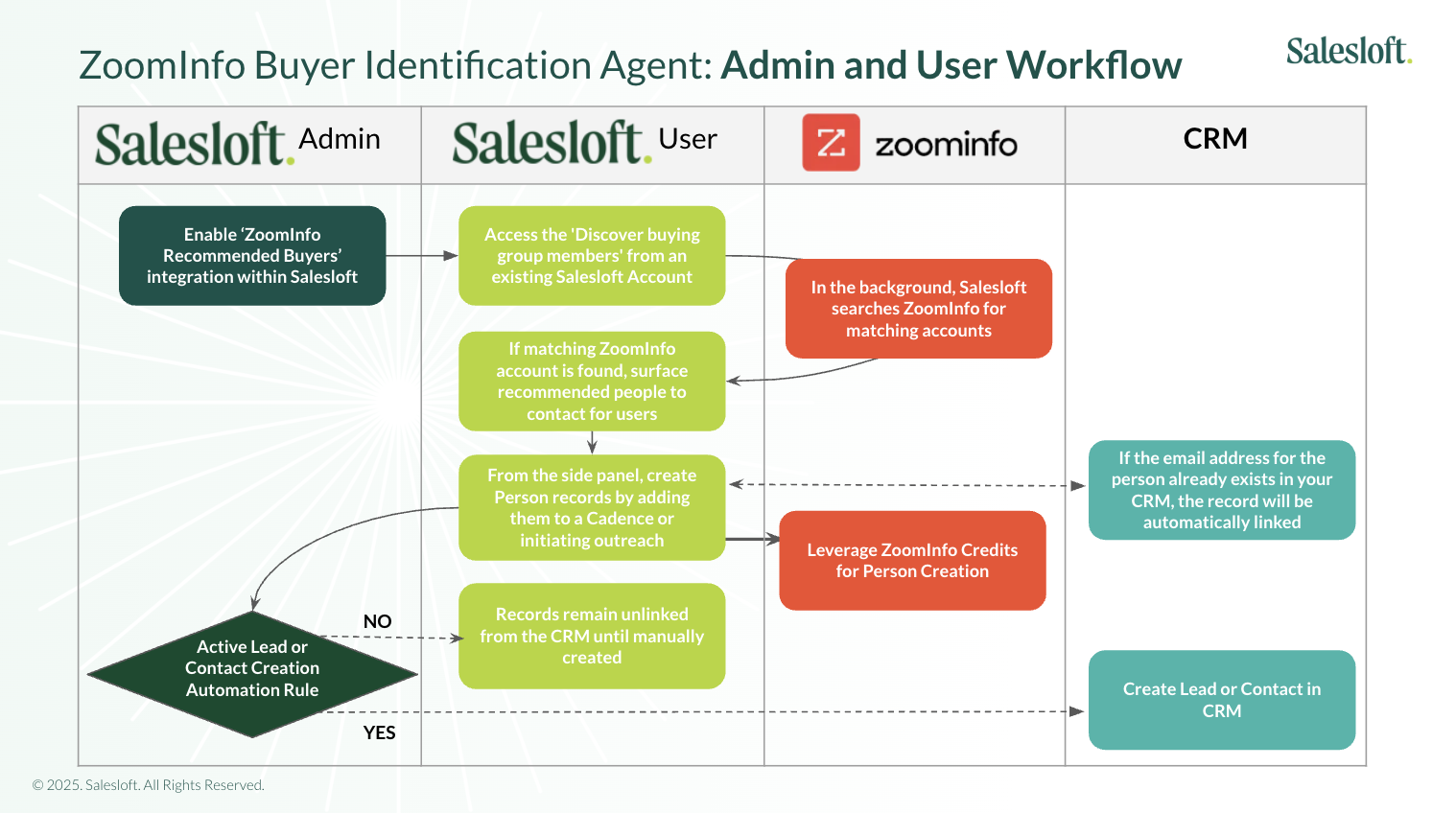
Figure 1: Zoom Buyer Identification Agent Workflow
2. ZoomInfo - Salesloft Integration (Powered by ZoomInfo)
(Configured by a ZoomInfo Admin. Configuration details available here.)
What it Does: This integration facilitates bulk record creation and automates user workflows via ZoomInfo Workflows and Salesloft Signals. It supports the following actions:
- Add People & Accounts: Automatically create People and their Accounts if they don't already exist in Salesloft. Users have the option to add the records to a Cadence upon export. See below for details on record creation.
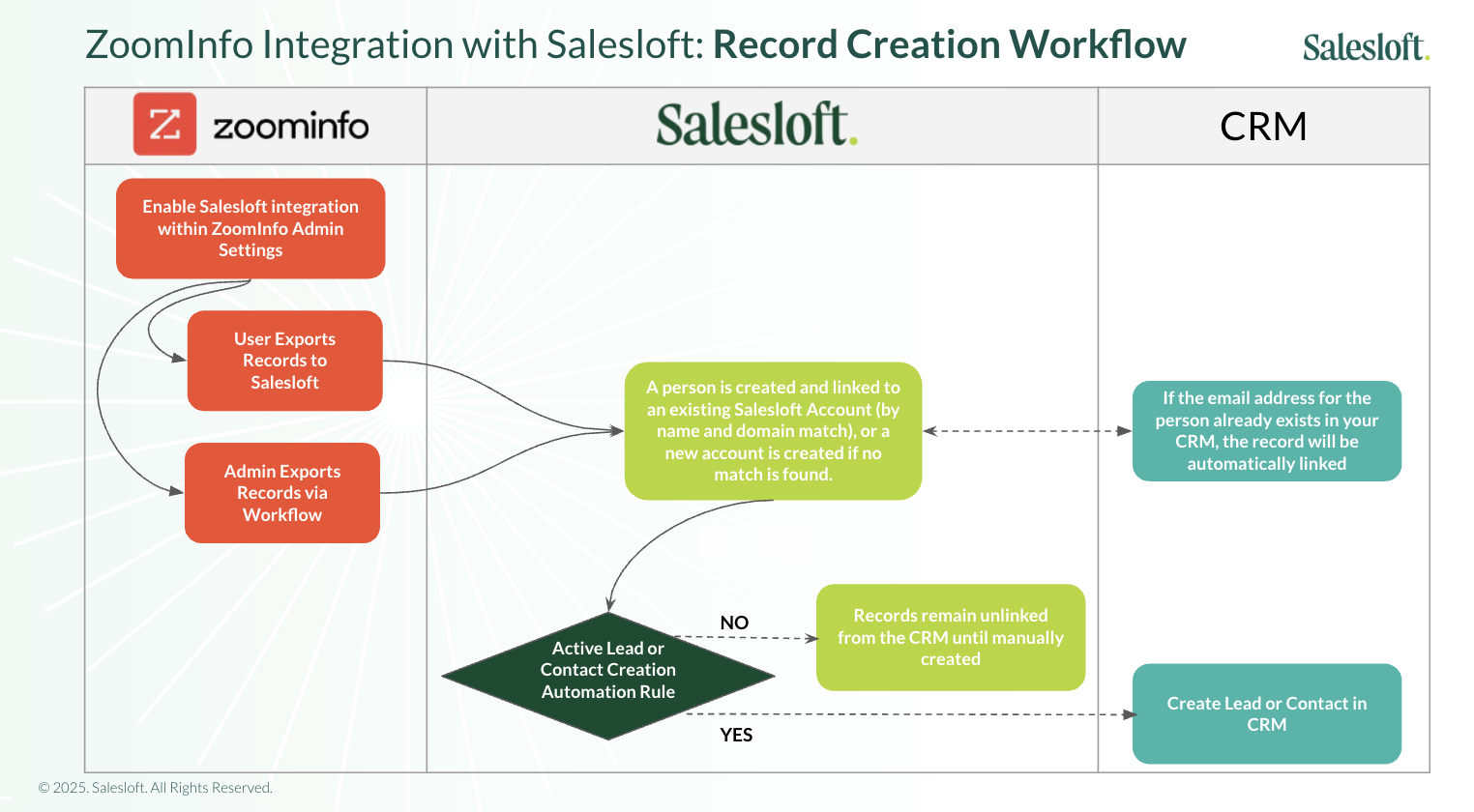
Figure 2: Zoom Integration with Salesloft: Record Creation Workflow
- Send ZoomInfo Signals to Trigger Salesloft Plays: Create Workflows in ZoomInfo that send signals to trigger Salesloft Plays, prompting users to take specific actions.
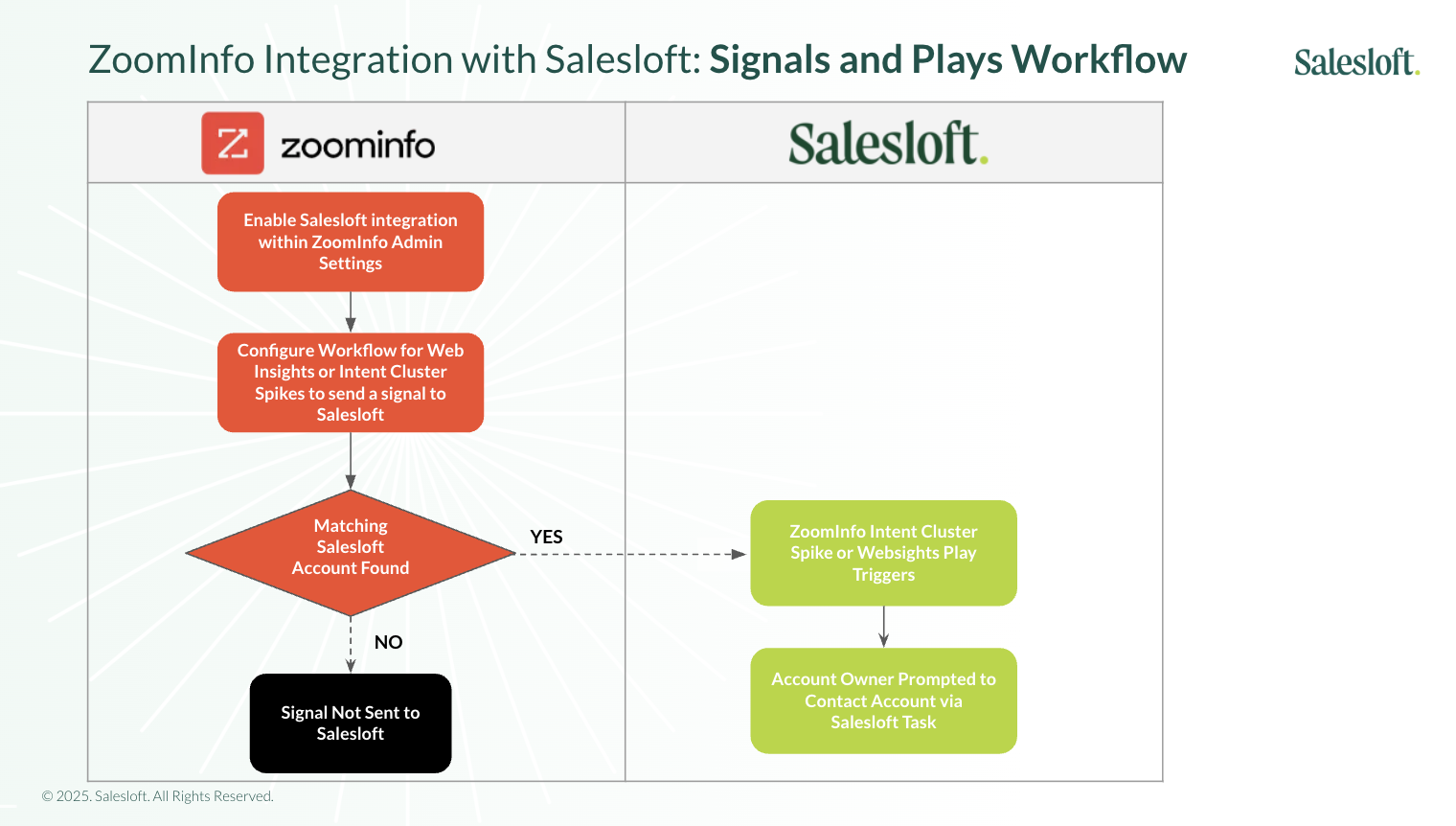
Figure 3: ZoomInfo Integration with Salesloft: Signals and Plays Workflow
How it Works:
For both integrations, newly created records will remain unlinked from the CRM unless an existing matching record with the same email address is found upon creation, or specific Automation Rules are in place. For more detailed information on this process, please refer to Resolving Unlinked People: Creating Leads or Contacts in CRM.
- Ease of Use: Quickly take action and streamline the prospecting process.
- Efficiency: Reduce context switching between platforms.
- Duplicate Account Creation: ZoomInfo matches existing Salesloft accounts based on an exact name or domain match. If an existing Salesloft account has a slightly different name or domain, a duplicate account could be created. This can be mitigated by configuring record creation to trigger back to the CRM, allowing newly created records to be reparented based on CRM logic.
- Credits: Both integrations require ZoomInfo Credits.
Q: Why does the Buyer Identification Agent say ‘Searching for key buying group members’?
- A: This message indicates the Buyer Identification Agent is attempting to find a matching account in ZoomInfo. It suggests that an account with this domain or name may not exist in ZoomInfo.
Q: Why do we have duplicate Accounts in Salesloft?
- A: ZoomInfo creates new accounts if an exact Account Name or Domain match isn't found during export. To prevent this, we recommend importing records via ZoomInfo > CRM > Salesloft, or ensuring all your CRM Account Names precisely match ZoomInfo Account Names.
Q: How does ZoomInfo determine which user to assign the Play tasks to?
- A: Task assignment can be defined in a workflow in ZoomInfo, or can be defined in a Play framework within Salesloft.