Using AI Agents to Coach Your Sales Team
Clari's AI Agents automate deal inspection across your pipeline, analyzing deal health and surfacing risks before they impact forecast accuracy. Sales managers use agent insights to focus coaching time on deals that need intervention.
How AI Agents Support Deal Execution
The Deal Inspection Agent analyzes every targeted opportunity in your pipeline daily. Instead of manually reviewing deals one by one, you receive automated assessments highlighting critical findings and missing criteria.
- The agent evaluates deals against qualification criteria your RevOps team defines in Clari Studio.
- These criteria match your organization's sales methodology, whether MEDPICC, BANT, SPICED, or a custom framework.
- Each deal stage has specific requirements that the agent checks automatically.
Agent insights surface in two places: the Guide homepage and Inspect: Opportunity views. Both locations show the same data, giving you flexibility to review deals where you already work.
The agent runs once daily at 11:00 AM CET.
Viewing Agent Insights on Guide Homepage
- The Guide homepage displays agent results for deals in your pipeline.
- You see which opportunities have critical gaps, which criteria are met or unmet, and what actions might move deals forward.
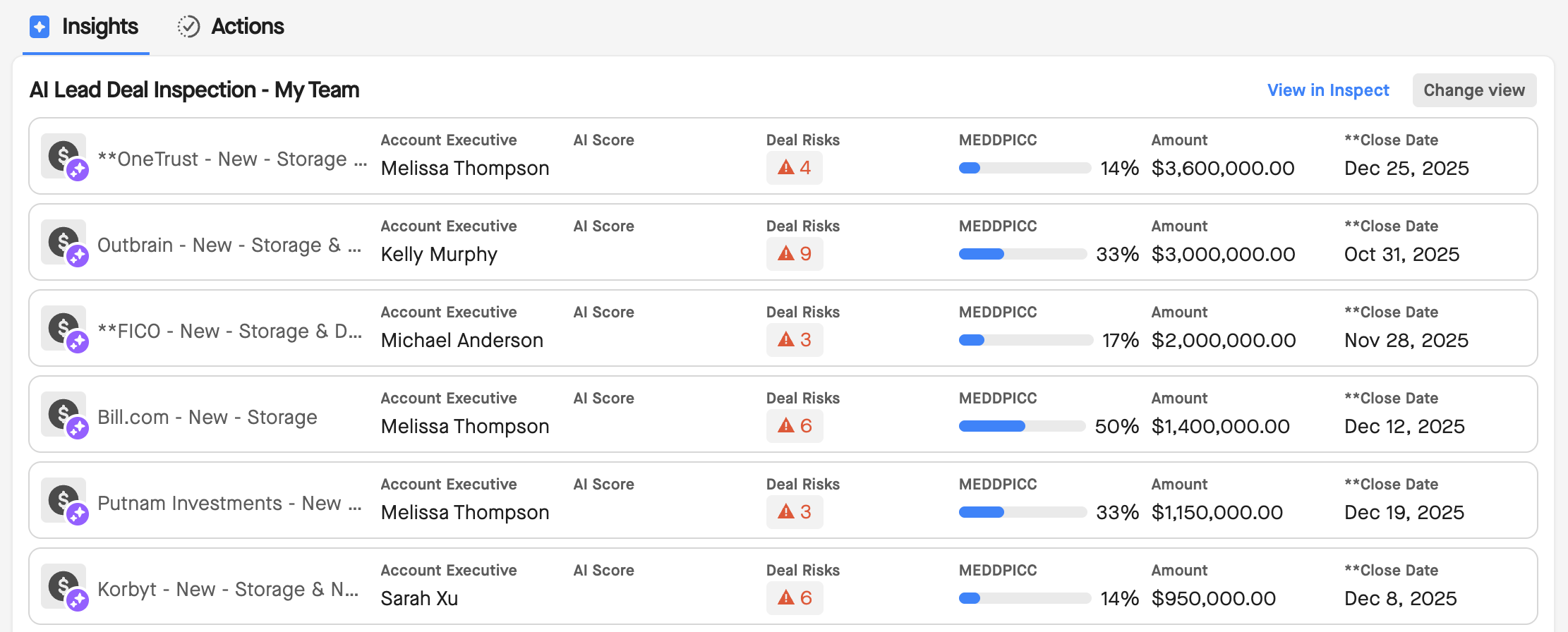
The agent organizes insights by category:
- Categories reflect your sales methodology and help you quickly scan for specific types of issues.
- For example, a MEDPICC-based configuration might show categories like Metrics, Economic Buyer, Decision Criteria, Decision Process, Identify Pain, and Champion.
- Each opportunity shows its overall health status.
- The agent calculates health based on how many criteria are met versus unmet for the current stage.
- A deal missing several requirements appears as higher risk than a deal meeting most criteria.
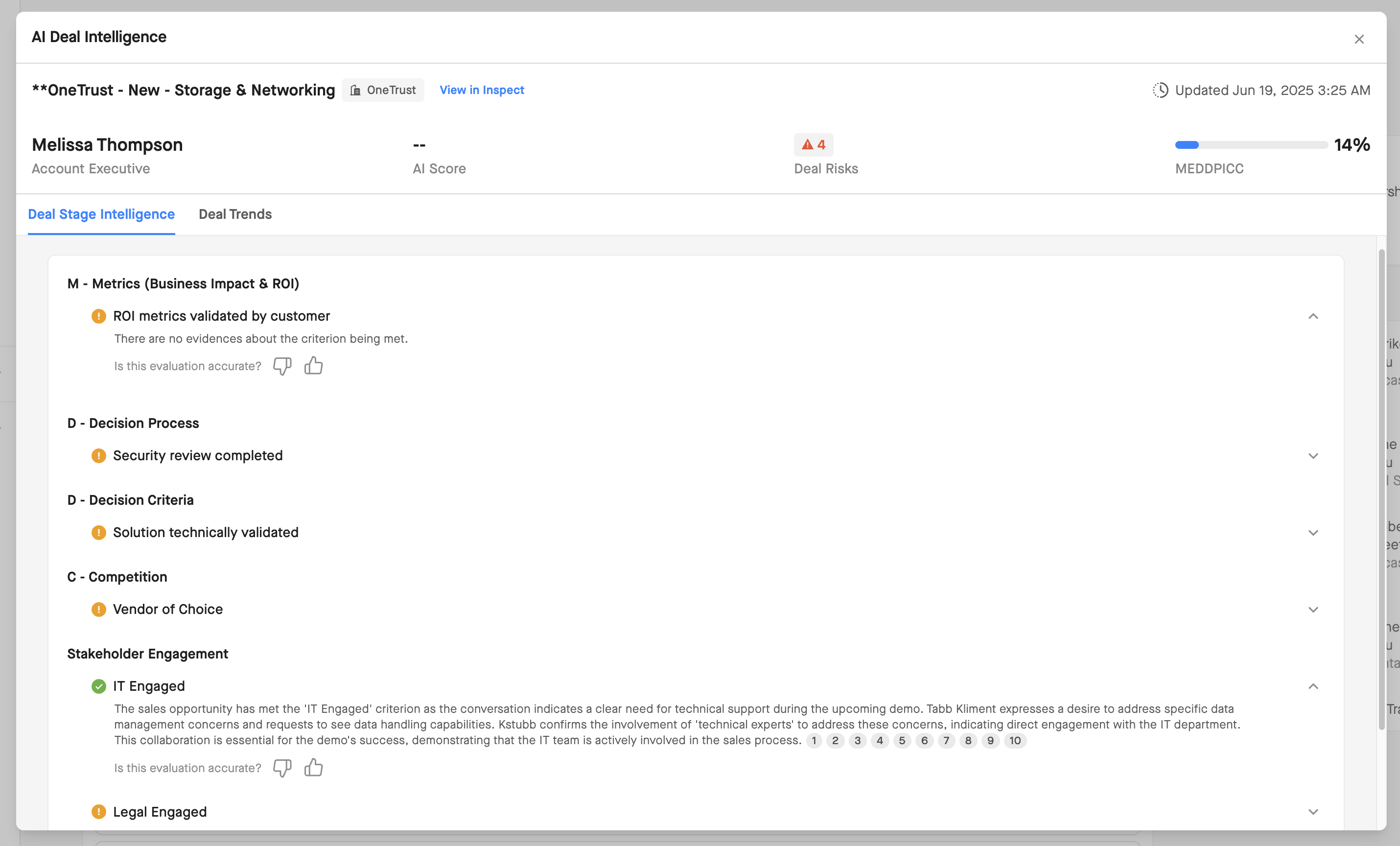
Click any opportunity to see detailed findings.
- The agent explains which criteria are satisfied, which need attention, and what evidence supports each assessment.
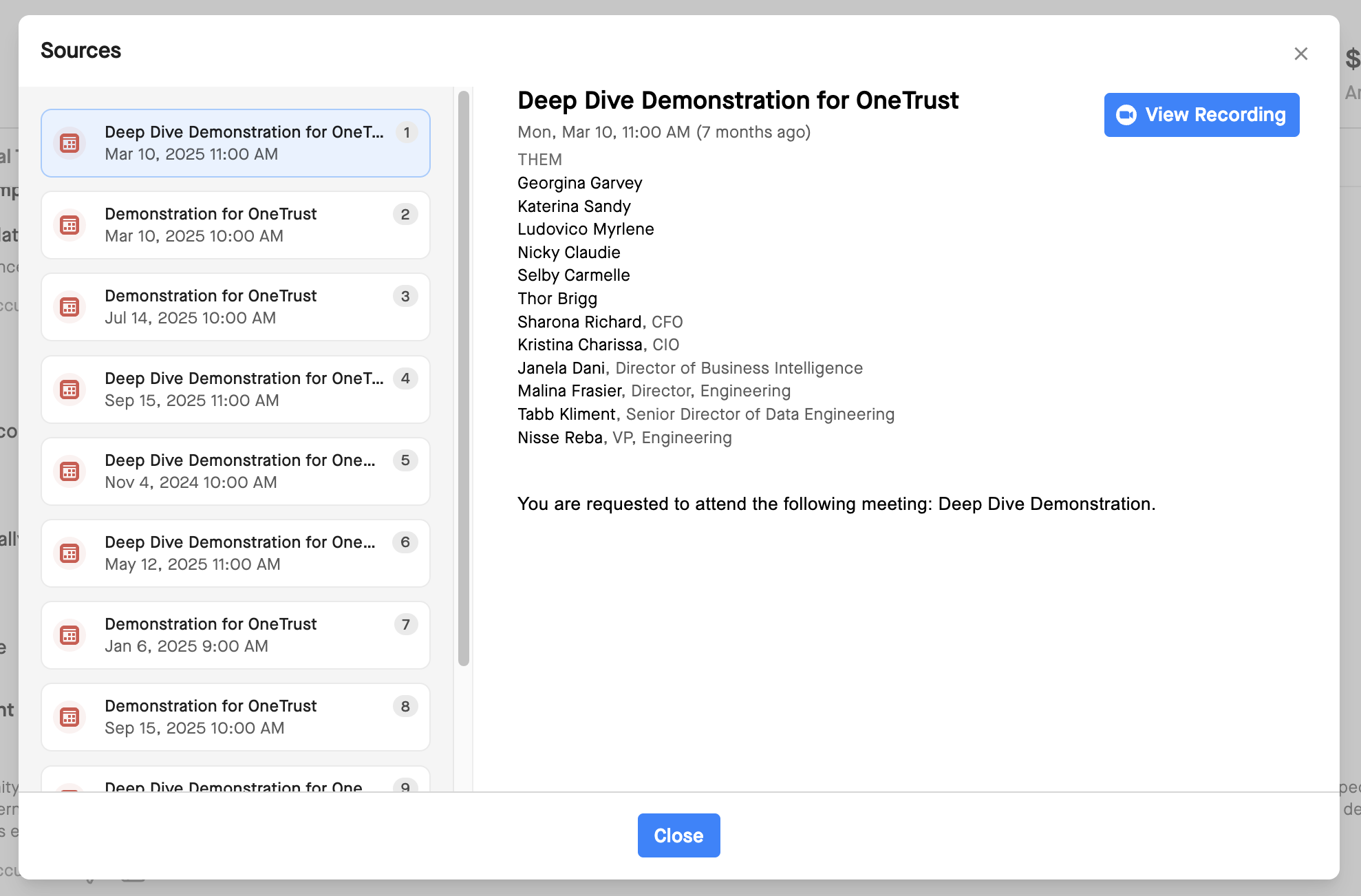
- When possible, the agent links directly to source data like call transcripts, emails, or CRM fields.
Accessing Agent Analysis in Inspect: Opportunity
Inspect: Opportunity provides comprehensive deal analysis in a modal view. Access agent insights by clicking the AI icon next to any opportunity in your grid.
The modal shows three sections: critical findings, criteria status, and agent insight summary.
- Critical findings highlight the most significant gaps or risks. The agent prioritizes issues based on impact to deal progression. Review these first when assessing whether a deal needs coaching.
- Criteria status lists every requirement for the current deal stage. Each criterion shows met, unmet, or partially met status. Expand any criterion to see supporting evidence and source references.
- Agent insight summary provides an overall health assessment. This summary synthesizes findings into actionable language, making it easier to communicate recommendations to your reps.
Stage-Specific Criteria
Agent insights change as deals progress through your pipeline. Each stage has distinct criteria based on what should happen at that point in your sales process.
A deal in Stage 2 might need economic buyer identification and budget confirmation. The same deal in Stage 4 might need technical validation complete and legal terms agreed.
The agent only evaluates criteria relevant to the current stage. This focuses your attention on what matters now rather than overwhelming you with information about past or future stages.
Your RevOps team configures stage criteria in Clari Studio. If you find criteria don't match how your team actually sells, work with your admin to adjust the configuration.
Understanding Agent Evidence
The agent cites sources for every insight. This transparency helps you validate recommendations and builds trust in AI-generated findings.
When the agent identifies a met criterion, it references specific activities or data points. For example, if champion identified is marked complete, the agent might link to a call transcript where the champion was discussed or a CRM contact field showing champion status.
When the agent flags an unmet criterion, it explains what's missing. For example, if next steps unclear is marked as an issue, the agent might note no upcoming activities scheduled or vague close plan in recent notes.
Source citations appear as links within each criterion.

Click through to review the underlying data. This is particularly useful when you need to verify findings before coaching conversations.
- The agent analyzes both structured and unstructured data.
- Structured data includes RevDB fields like close date, stage, and amount.
- Unstructured data includes call transcripts and email content.
- Organizations without Copilot or activity data still benefit from agent insights based on CRM fields alone.
Coaching Your Team with Agent Insights
Agent insights reduce the time you spend manually inspecting deals. Instead of reviewing every opportunity, focus on deals the agent flags as high risk or missing critical requirements.
During one-on-one coaching sessions, reference specific agent findings. Rather than asking general questions, address gaps the agent identified. For example, if the agent notes decision criteria are undefined, ask your rep to walk through what the customer is evaluating and how they'll make a decision.
Agent insights provide objective, data-backed observations. This removes subjectivity from coaching conversations and helps reps understand exactly what needs attention.
When reps disagree with agent findings, review the evidence together. The agent might be correct, or it might lack context only your rep knows. If the agent consistently misses nuances, share this feedback with your RevOps admin to refine criteria or prompts.
Use agent insights to identify patterns across your team. If multiple reps struggle with the same criterion, this suggests a broader coaching need or process gap. Address these patterns in team meetings or training sessions.
Agent Insights and Forecast Calls
Agent analysis supports more accurate forecast calls. Rather than relying on rep optimism or gut feel, you have systematic deal inspection backing your commit decisions.
Before forecast meetings, review agent insights for deals in your pipeline. Focus on opportunities with unmet criteria that typically correlate with slippage or loss. If a deal lacks executive engagement or clear next steps, flag it as at risk even if the rep forecasts commit.
During forecast discussions, reference specific agent findings when challenging rep forecasts. For example, "The agent shows we don't have economic buyer engaged, which historically means deals slip. What's changed here?"
Agent insights don't replace your judgment. They provide additional data points to inform decisions. A deal might have unmet criteria but still close because of factors the agent doesn't capture. Use insights as one input among many.
Filtering and Sorting by Agent Data
Agent results write to RevDB as standard opportunity fields. This means you can filter, sort, and group deals based on agent insights.
Create saved views showing only deals with critical findings. This gives you a quick list of opportunities needing immediate attention.
Sort opportunities by health score or number of unmet criteria. Focus coaching on the worst-performing deals rather than spreading attention evenly across your pipeline.
Group deals by specific criterion status. For example, filter for all opportunities missing champion identified to run targeted coaching on building internal advocates.
These filtering capabilities make agent insights actionable at scale. Even with large pipelines, you can quickly identify where to invest coaching time.
Access and Permissions
You only see agent insights for opportunities you have access to through saved views and lenses. The agent respects all existing role-based permissions.
If your organization restricts you to specific territories or teams, agent insights reflect only those deals. You never see analysis for opportunities outside your permissions.
This governance happens automatically. You don't need to configure anything. The same access rules that control what you see in grids and dashboards control what agent insights you can view.
Current Limitations
The agent operates with several constraints:
- Daily refresh cycle: The agent runs once per day, not in real time. If a deal changes significantly mid-day, you won't see updated analysis until the next morning. Plan coaching conversations knowing insights might be up to 24 hours old.
- Single deal focus: The agent evaluates opportunities individually. It cannot tell you which five deals across your pipeline need the most urgent attention based on combined revenue and risk. You still need to prioritize which deals to review first.
- No predictive recommendations: The agent identifies current gaps but doesn't predict outcomes or suggest specific actions based on historical patterns. It won't say "deals like this lost 68% of the time" or "adding these activities improved close rates by 20%."
- No external notifications: Agent insights only appear in Clari. You don't receive Slack messages, emails, or CRM tasks alerting you to critical findings. Check Guide or Inspect views regularly to stay current on agent analysis.
- Limited methodology customization: The agent accepts methodology uploads but cannot weight criteria differently by segment or territory. Organizations with highly granular processes might find recommendations somewhat generic.
- Clari-only visibility: Agent results don't sync to your CRM. If you work primarily in Salesforce, you need to check Clari separately to see agent insights.
Getting Help
If agent insights seem inaccurate or miss important deal context, share feedback with your RevOps admin. They can refine criteria, adjust prompts, or modify configuration to improve accuracy.
For questions about accessing agent insights or interpreting specific findings, contact your Customer Success Manager.
The Solutions Engineering team has worked with early adopters to develop coaching best practices. Reach out to your SE contact for recommendations on integrating agent insights into your deal review process.
