Plays allow you to create signals from any account or opportunity update, enabling you to automate workflows and unlock data from other business systems without custom APIs.
In addition to these signals, Salesloft allows you to import Custom Objects and use their data in Plays.
In this article, you will learn how to create Plays from CRM custom object signals. This article includes:
- This feature is only available to customers on the Elite plan who use Salesforce as their CRM.
- The custom object must have a relationship with either a Person or Account object in Salesforce.
- Ensure you have permissions to modify CRM Sync settings.
- Custom objects from Dynamics or HubSpot CRMs are not currently supported.
Imported custom object data will be available to use in Plays, just like standard object data.
To import custom objects into Salesloft, follow these steps:
- Navigate to Import Custom Objects: Go to your Settings under the Data section. Select Object and field configuration. In the Object and field configuration section, select Import custom objects. Salesloft will search for objects associated with Accounts and People.
- Identify the Object: Select the custom objects you want to import.
- Remove unneeded objects: Deselect any custom objects you don’t want to sync.
- Save your configuration: Click Save.
- Create a Play using Custom Object: Imported custom object data will be available to use in Plays. For further information, check out our Create a Play help doc.
Things to note: After your initial import, your custom objects will sync with SFDC every 10 minutes. Only objects related to Person or Account objects will be available to sync.
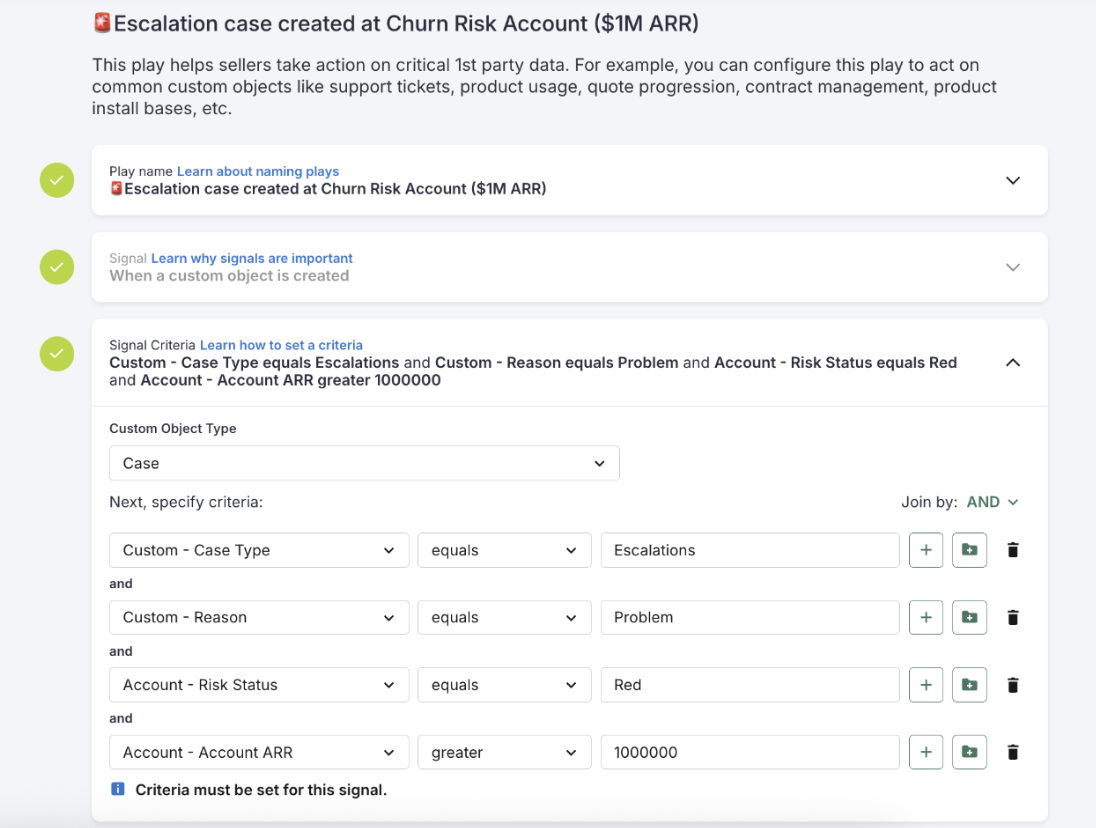
Figure 1: Example: Custom Objects as Play Criteria
- For further information on Person and Account field configuration, check out our Person Field Configuration and Account Field Configuration help docs.
- Please note that the custom object records themselves will not be visible on People and Account records.
- CRM Sync logs for custom objects are coming soon, for further information on CRM Syncing, check out our CRM Sync help doc.
- Start building Plays using custom object data.
- Adjust your sync frequency as needed.