Sales forecasts impact business decisions across your entire organization. When a team is hitting their number and accurately forecasting, they can double down on investing in their business: increasing headcount, developing marketing campaigns, investing in new technology, and more.
When it comes to creating a forecast, each team member throughout the entire revenue chain, from individual sellers to sales executives, are likely required to submit a forecast. The forecast numbers that are submitted bubble up into one, company-wide forecast metric.
But what role will each team member play using Salesloft’s Forecast? The Forecast Dashboard will appear a little bit differently based on who you are—mainly, if you’re an individual contributor or a manager.
In this article, we will take a look at each role involved in creating a sales forecast and how they will use Forecast in Salesloft, including:
Sales representatives (Sales reps) are the sales professionals responsible for managing/closing new business, renewal, or expansion opportunities. They are individual contributors who focus on a couple to many potential opportunities at any given time.
In terms of sales forecasting, sales reps are typically required to make sure their pipeline is fully updated, amounts are accurate, and their forecasting fields are completed. The updates and amounts they provide build the foundation for the entire company’s sales forecast.
Overall, most sales reps’ top priority is to hit their quota. So, in order for managers and leaders to receive the numbers they need, preparing a forecast needs to be fast and effortless for reps.
Inside Salesloft’s Forecast for Sales Reps
The sales reps’ Forecast view in Salesloft will only show their name, title, and opportunity data by default, since they don’t have any direct reports. This also helps reps to focus on their number and their number only.
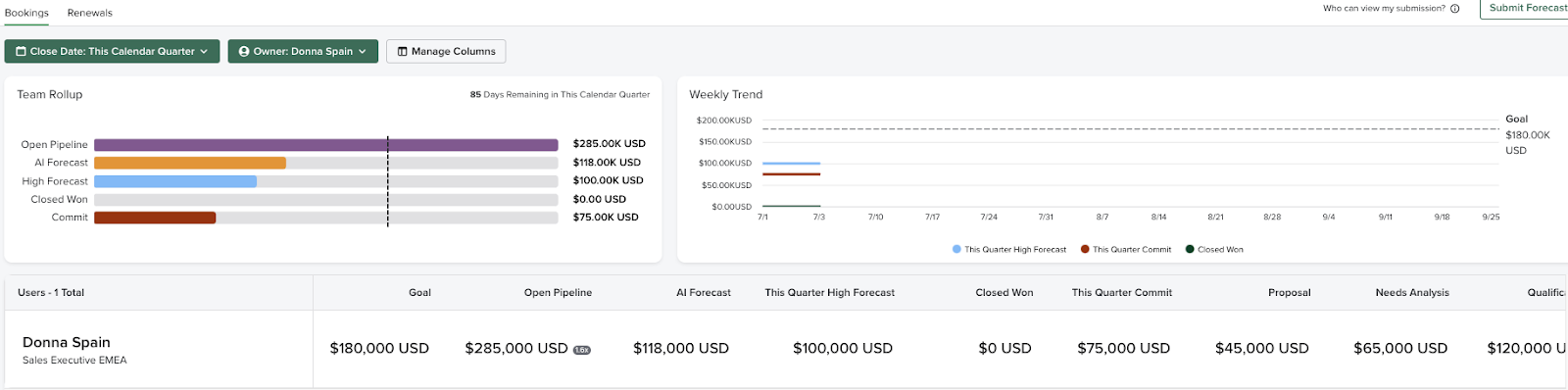
Inside Forecast, sales reps can perform the following actions to contribute to team-wide success:
- Submit Your Own Forecast: Each rep will submit their own forecast number to the team.
- Things to Note: If you do not submit a Forecast inside Salesloft, the field will be blank in your Hierarchy Table and in your manager's and sales leader's Hierarchy Tables.
- Review Your Deals with Your Manager: The Hierarchy Table rolls all of your opportunity metrics into one, comprehensive view. When sharing updates with your manager, expand the Opportunities view to see a filtered list of your pipeline. This can help you discuss any obstacles getting in the way of closing a deal.
- Act on Opportunities to Save At-Risk Deals: Drill into the Weekly Trend Chart’s Opportunity Changes to see which are progressing well and which are facing challenges. You can select a deal from the Opportunity Changes window and immediately reach out to key stakeholders by adding them to Cadence, sending them an email, or even texting them on the spot. Reps can even capture actions or next steps that come out of the discussion, to follow up with deals after your review.
Things to Note: For a Sales Rep to access the Forecast page, an admin will need to assign their role the role permission called Forecasting.
Front Line Sales Managers, or sales managers, are the team members who manage your sales reps, like Account Executives and Account Managers. Sales managers typically manage anywhere from five to ten reps (sometimes more) and oversee average tens to hundreds of deals owned by the sales reps. They report to a sales leader with the role of Director, VP, or SVP of Sales, depending on the company size and hierarchy.
The sales manager’s role is to coach their reps throughout sales processes and pressure test the forecast so they arrive at a realistic number for the quarter. If a sales manager spots risk in the pipeline, it’s their job to help the rep identify deals to pull in or an action plan to get the rep back on track.
In Forecasting, the sales manager submits a forecast number to their direct superior. In order to do that, they gather the forecast of all of their sales reps' deals or call numbers to create one team-wide forecast amount.
Inside Salesloft’s Forecast for Front Line Sales Managers
A Front Line Sales Manager directly manages a group of sales reps, so inside Forecast they will see themselves and their direct reports listed in the Hierarchy Table.
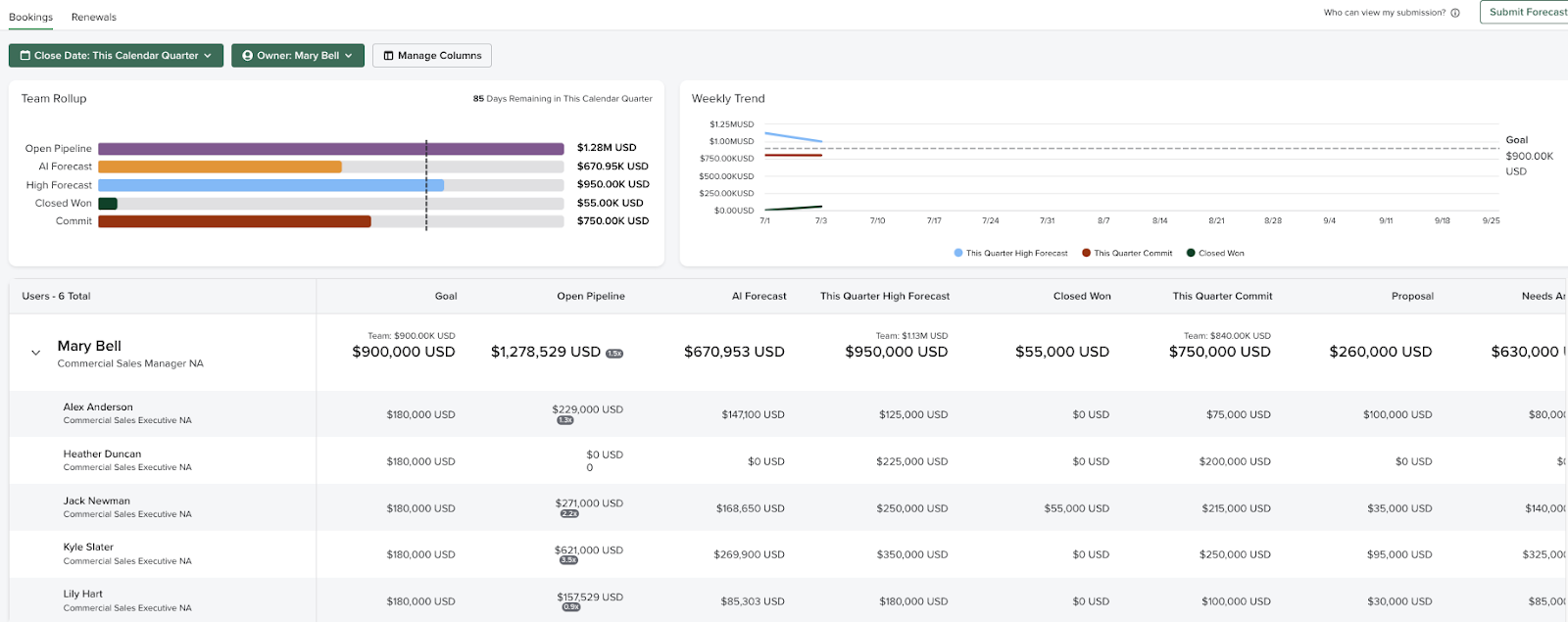
Inside Forecast, Sales managers can use the following tools to assist with forecasting:
- Submit their own Forecast: Each manager will submit their own forecast number to the team.
- Contribute to Forecast Reviews with Leadership: Use the Weekly Trend Chart and Hierarchy Table to share updates on revenue performance relative to company goals during forecasting meetings.
- Guide Sales Reps through Deal Reviews: Use the rollup data in the Hierarchy Table to learn how deals are progressing. By viewing completed actions, sales managers can feel confident that the metrics in front of them are accurate. Then, you can coach your rep on what sales practices are working well and where they need to improve.
Things to Note: For a Sales Manager to access the Forecast page, an admin will need to assign their role the role permission called Forecasting.
The Sales Leaders are quota-bearing sales leadership above the Front Line Sales Managers, all the way up to the CRO. Sales Leaders will make the ultimate decisions when it comes to forecasts based on the numbers they see roll in from sales managers and reps.
A culture of sales forecast accuracy starts from the top down. It’s important for sales leadership to promote sales forecasting accuracy and even tie compensation to it, if necessary.
The most advanced sales leaders hold a variety of sales meetings (forecast call, pipeline call, QBRs, etc…) to ensure regular inspection and execution.
Inside Salesloft’s Forecast for Sales Leaders
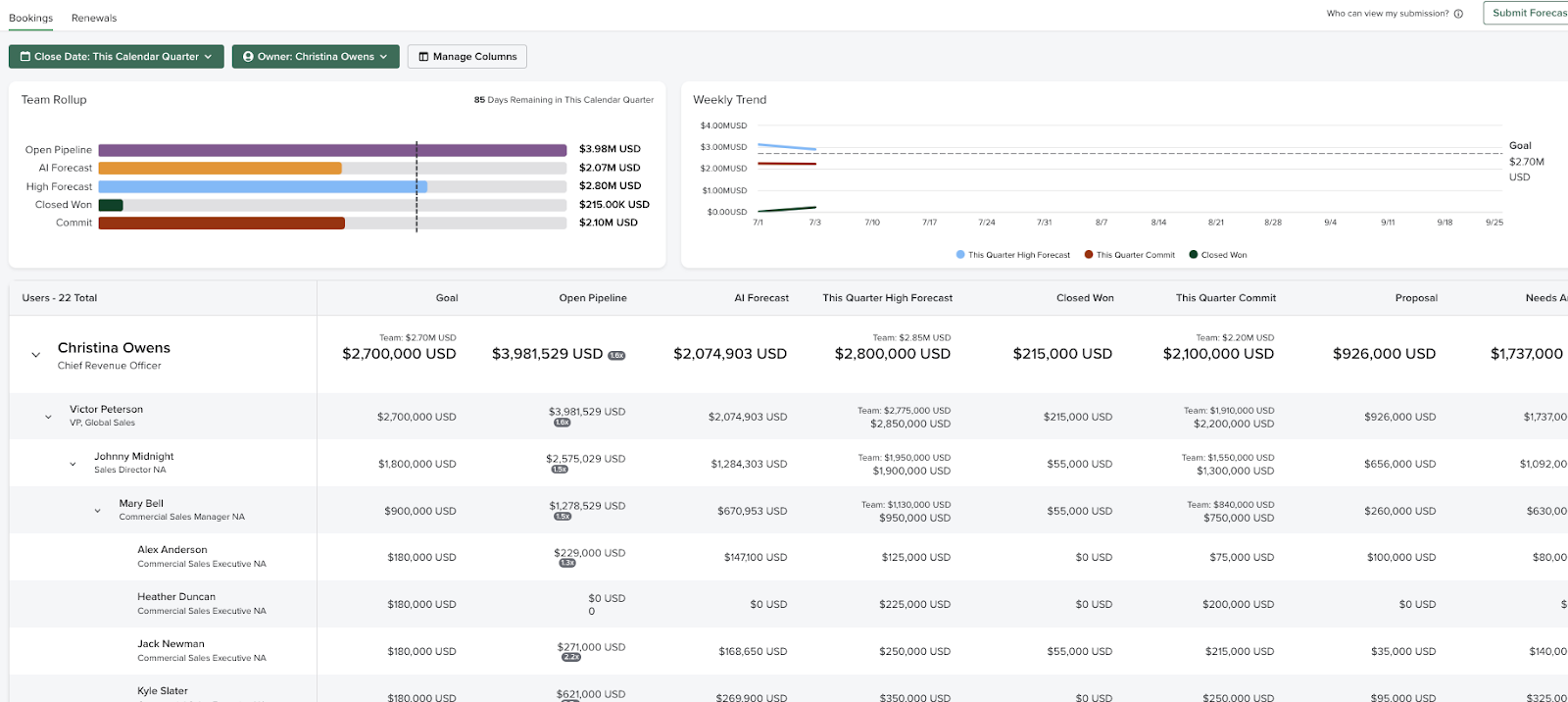
The Sales Leader, whether they are a VP, Director, or CRO, is a direct or indirect manager of everyone in the sales hierarchy. Given that they will be able to view all people within the hierarchy and can drill down all the way to the bottom of the hierarchy.
Revenue Operations (RevOps) is the end-to-end business process of driving predictable revenue, across marketing, sales, renewals, and expansion through transparency and execution rigor. The role of Revenue Operations is to deliver visibility across the entire revenue team, improve efficiency across the revenue process, drive revenue predictability, and achieve revenue growth.
For Forecasting, they are oftentimes driving the process of the forecast and rollout of this process to the sales team. They can bring best practices and help arrive at a number the organization is confident in.
Inside Salesloft's Forecast for Revenue Operation Members
Within Salesloft, Revenue Operation members likely won’t be submitting a forecast but need access and visibility into the entirety of the forecast. So they will likely need to be able to access the full hierarchy, all opportunities, and all forecasts in a view like this:
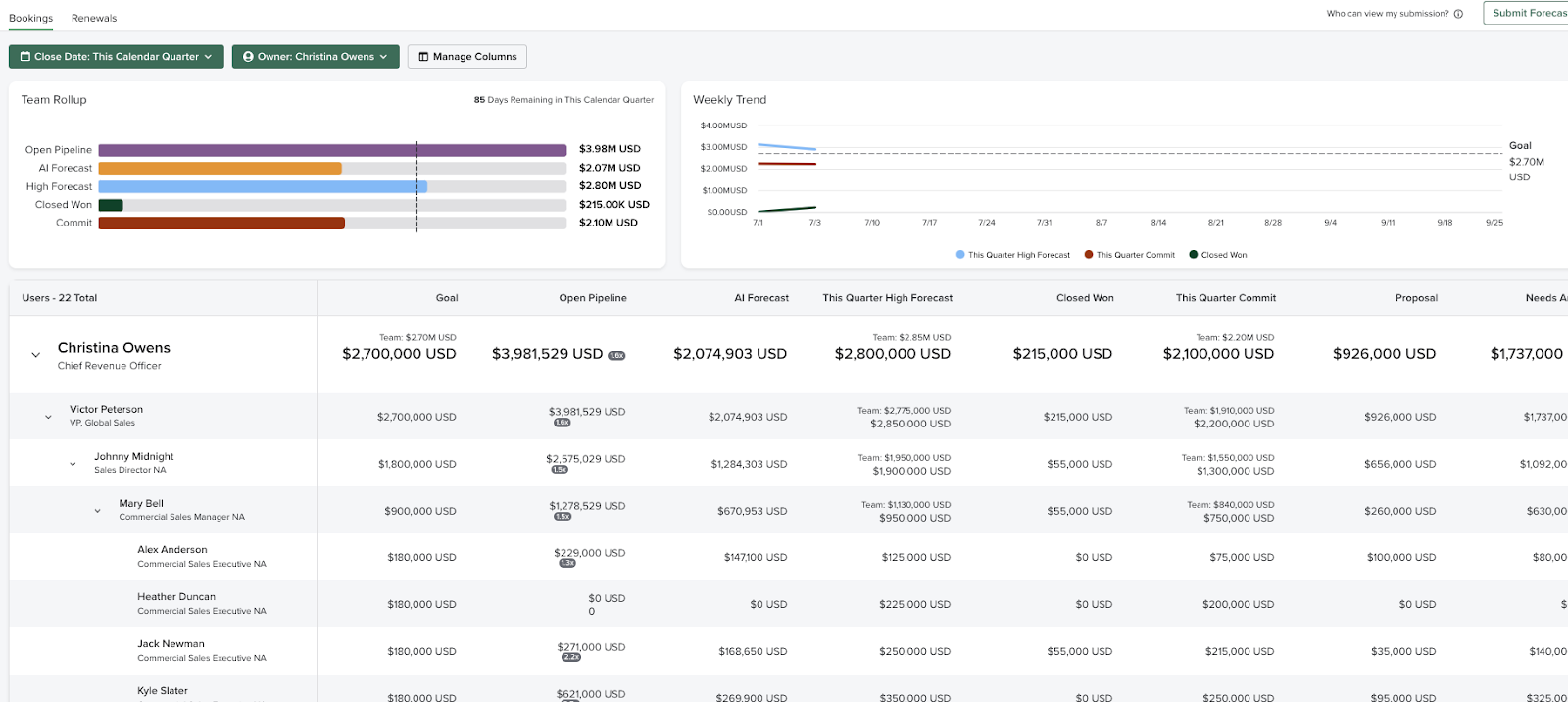
Things to Note: To grant full access to Forecast, they will either need to be an Admin or be assigned the Forecasting and View All Opportunities Role Permissions by an admin.