The Model Context Protocol (MCP) is an open-source standard that enables AI models to securely connect to external data sources, tools, and systems.
Salesloft's MCP Server lets AI hosts (like Claude) pull live data directly from Salesloft.
By opening up Salesloft's data to external LLMs, the MCP Server lets teams get advanced analytics and custom insights using your tools, for your org’s unique needs.
In this article, you will learn about Salesloft’s MCP Server, including:
Prior to using Salesloft’s MCP Server, there are some important things you need to know:
- The Salesloft MCP server is available for Salesloft Agentic Customers only. Teams that have purchased one of the Agent packages — like the Account Agent or Coaching Agent packages —will get the MCP Server included.
- You must have Salesloft Admin rights to enable the MCP Server toggle for users.
- Salesloft ensures that only authenticated, authorized, and licensed users can connect via the Salesloft MCP server. Users authenticate with their existing Salesloft credentials and no separate accounts are needed to access the tools via the Salesloft MCP Server.
- Data is from the user’s Salesloft instance. No data is cached outside the Salesloft perimeter; the AI assistant only "sees" the data during the active chat session.
- While Salesloft does not use the data for training, the ability for LLMs or Agents to use it depends on how customers have set up their specific contracts and plans with those providers.
- MCP is covered under Salesloft’s existing SOC 2 and ISO 27001 scopes.
- MCP calls do route through the Salesloft API, so they count against your standard API limits.
- Claude Desktop and ChatGPT are the currently supported clients.
- The MCP Server does not support:
- any updates/writes/deletes. Only reads are allowed.
- searching or retrieving cadences or performance of cadences
In order for users to take advantage of the Salesloft MCP server, a team admin will need to enable the MCP server.
To enable the Salesloft MCP server for users, follow these steps:
- Go to the Article Intelligence Admin Settings: In Salesloft, go to the Settings page as an Admin. Select the Artificial Intelligence Settings under the Data section.
- Locate the Salesloft MCP: In the Artificial Intelligence Settings, scroll to find the Salesloft MCP section
- Enable the Salesloft MCP: Toggle the setting to "Enable MCP Server." This makes the server discovery URL active for your team. When enabled, the toggle will be blue.
- Share the relevant setup instructions for users based on their AI tool: Once the Pre-Configuration has been set up by an Admin, users will be able to connect to their AI tool. Share these instructions for users to connect the Salesoft MCP to Claude or Connect Salesloft MCP Server in ChatGPT.
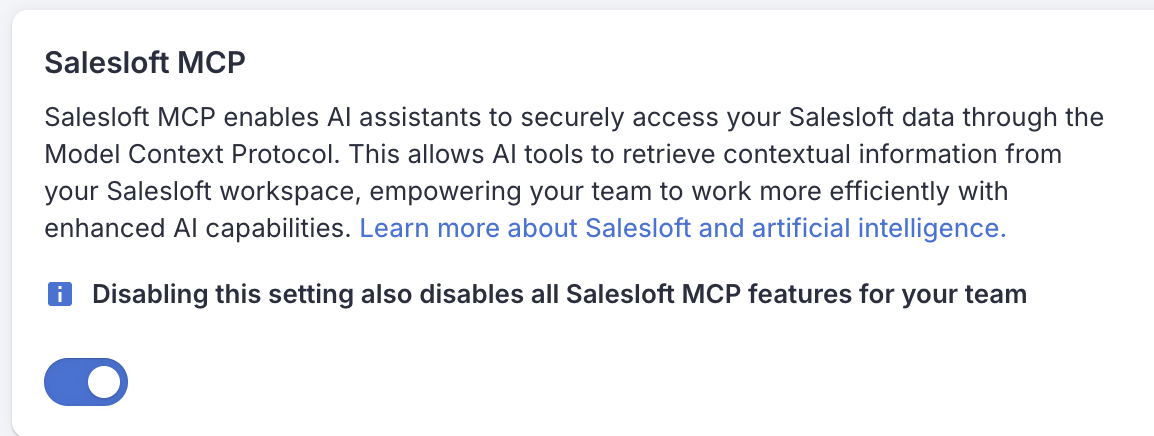
Figure 1: The Salesloft MCP toggle in settings.
| Tool | Queries which object | Data returned | Notes/Usecases |
| account_by_id | Accounts | Data about a company/account including name, description, domain, etc. as well as references (by URL) to the associated User who owns an Account, User that created the Account, etc. | https://developers.salesloft.com/docs/api/accounts-show/ |
| conversation_by_id | Conversations (extensive) | Detailed conversation data including participants, messages, etc. | https://developers.salesloft.com/docs/api/conversations-find-one-extensive/ |
| conversation_recording_by_id | Conversation Media | Audio/video recording data for conversations | https://developers.salesloft.com/docs/api/conversations-find-one-conversation-recording/ |
| current_team | Teams | Given the provided auth context, returns data about the Salesloft Team with which the end-user is associated | https://developers.salesloft.com/docs/api/team-index/ |
| current_user | Users | Given provided auth context, returns data about the Salesloft User who is interacting with the MCP client | https://developers.salesloft.com/docs/api/me-index/ |
| opportunity_by_id | Opportunities | Data about deals from CRM | https://developers.salesloft.com/docs/api/opportunities-show/ |
| person_by_id | People | People includes records like contacts or leads that are stored in salesloft. | https://developers.salesloft.com/docs/api/people-show/ |
| search_accounts | Accounts | Salesloft ID, Account Name, Account OwnerID… [Account Fields + Account Custom Fields] | https://developers.salesloft.com/docs/api/accounts-index/ |
| search_conversations | Conversations | ID, title, duration, creation_date, account details and person details | https://developers.salesloft.com/docs/api/conversations-find-all/ |
| search_opportunities | Opportunities | Opportunity data like opportunity name, type, amount, stage, account name | https://developers.salesloft.com/docs/api/opportunities-index/ |
| search_people | People | ID, fist_name, last_name, email, job_title | https://developers.salesloft.com/docs/api/people-index/ |
| search_users | Users | List of Users ID, guID, name and email | https://developers.salesloft.com/docs/api/users-index/ |
| user_by_id | Users | User ID, guID, name and email | https://developers.salesloft.com/docs/api/users-show/ |
AI-powered Revenue Query Examples
Below are some examples of prompts you can use in Claude after setting up your MCP:
|
Persona
|
Prompt
|
|
Rep
|
"Summarize my last three calls with Acme and tell me what objections keep coming up."
|
|
Rep
|
"What did we agree to as next steps after the Acme QBR call last Tuesday?"
|
|
Manager
|
"Which deals in my team's Q2 pipeline are most at risk of slipping based on recent calls?"
|
|
Manager
|
"Compare how much talk time my reps are getting vs. prospects on discovery calls this month."
|
|
Manager
|
"Who on my team hasn't logged a customer interaction in the last 5 days?"
|
|
CRO
|
"What's our current pipeline revenue against Q2 target, broken down by segment?"
|
|
CRO
|
"Which enterprise deals closing this quarter have had no executive-level contact in the last 30 days?"
|
|
CRO
|
"How has average deal cycle length changed quarter over quarter in the mid-market segment?"
|
|
RevOps
|
"Show me all deals that moved backwards in stage this month and the call activity preceding each slip."
|
|
RevOps
|
"How many deals closed last quarter had fewer than 3 calls logged?
|
|
RevOps
|
“What was the average deal size last quarter?"
|
Q: Is Salesloft MCP an official Salesloft app?
Salesloft MCP is a standardized interface (built on the open Model Context Protocol) that allows external AI assistants to securely interact with your Salesloft data. It is currently in the Crawl (Beta) phase.
Q: Does the AI assistant "train" on my Salesloft data?
No. The MCP server acts as a secure "read-only" window (or "context provider"). Your data is pulled into the current chat session to answer your specific prompt, but it is not used to train the underlying LLM.
Q: What happens if I ask about a deal I don’t own?
The MCP server follows Salesloft’s existing permission model. If you don't have permission to see a record in Salesloft, the AI will receive a "403 Forbidden" or an empty result when it tries to fetch that data.
Q: How do I revoke access for a specific user?
Since access is tied to the user’s Salesloft API Key, you can revoke their key within Salesloft Settings under API Keys. Additionally, turning off the "Enable MCP Server" toggle at the organization level will disconnect all users.
Q: Does this count against our Salesloft API rate limits?
Yes. Every query the AI makes (e.g., searching for an account) uses standard Salesloft API calls and counts toward your organization's rate limits.
- 401 Unauthorized: This usually means your API Key is incorrect or has been revoked. Generate a new key and update your config.
- Missing context or not pulling Saleloft information: Ensure your Salesloft tool is connection is enabled and allowed. (See steps 4 and 5 of the Setup for Salesloft MCP Users via Claude Custom Connector section for details.)