What happens if I hit a Salesforce validation rule in Clari?
Validation rules are great for ensuring data quality, but can be challenging when you encounter one as you’re updating a deal.
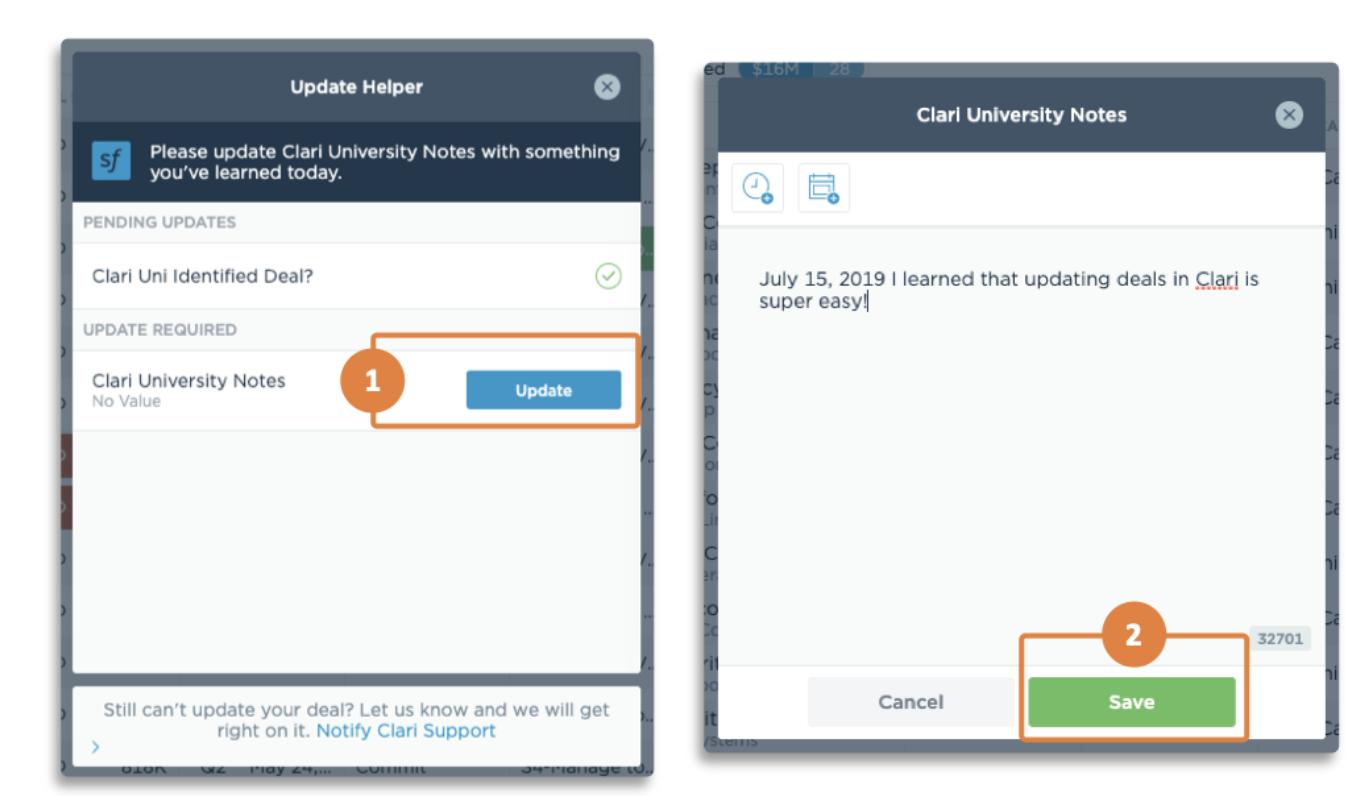
If you run into a validation rule while updating your deals in Clari, then the Update Helper will guide you through to make the experience as smooth as possible. Here’s what to expect:
- If you try updating a field (i.e. Stage) and hit a validation rule, the Update Helper will appear as a pop-up window.
- The Update Helper will display the additional field(s) that you need to update before your initial change can be saved in Salesforce.
- Click the Update button next to the field, make your change.
- Click Save.
- If there are multiple fields you need to update, then Update Helper will guide you through all of them.
Unconfigured Validation Rules
If you're a Clari Admin, you probably remember that Clari will honor the validation rules from Salesforce. If you make any changes to your validation rules in Salesforce, then you should reach out ASAP.
If a user runs into a Salesforce validation rule that has not been configured in Clari, then instead of seeing the field(s) that need to be updated in the Update Helper, the Update Helper will display any and all fields that have been configured/pulled into Clari. Thus, the user can't be sure which field(s) need to be updated — or if the field that they need to update is displayed in Clari at all. This is why it is critical to reach out to support when you make changes to your Salesforce validation rules.
