Why can't I find the deal(s) that I'm looking for?
Step 1: Check Your Clari Role
If you're not seeing the opportunities that you expect to see in a View, verify that you are assigned the correct Clari Role. To do so:
1. Click on your name in the top-right corner of the screen and select Account Settings.
2. Ensure your Clari Role matches your needs.
If your Clari Role doesn't match your needs, reach out to your company's Clari Admin.
Use the table below to validate you made the right selection:
| Role | Description |
| Sales Rep | I own my deals. |
| Deal Team Member | I am a Sales Engineer or a Solutions Architect. |
| Sales Manager | I manage a team of reps. |
| Sales Executive | I manage multiples teams of reps. |
| Other | I am in Sales Ops, Channels, or another team aligned to Sales. |
Step 2: Check Your Filters
If you're assigned to the correct Clari Role, and you still don't see the opportunities you're looking for, then you might need to adjust the Filters in your View.
Check your applied Filters:
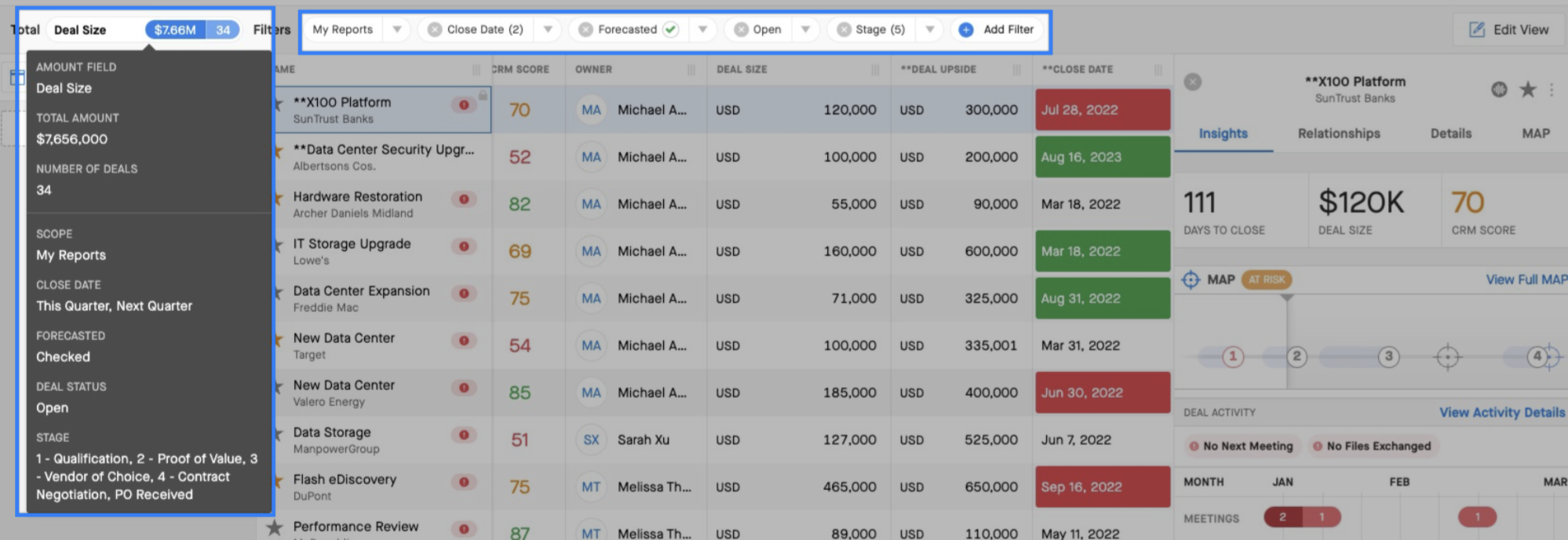
Hover over the blue Filter pill in the upper left-hand corner of the Opportunity Grid to see the exact Filters you're using. You may see that you're using Filters that omit the opportunity you want to see.
For example, if you want to see a deal that's set to close next quarter, but you are filtering for deals that closed last quarter, you can adjust the Close Data Filter.
Further Learning
To learn more about leveraging your filters in Views, check out our article on Saved Views and Filters.
