Copilot Transcription and Language Support
Clari Copilot transcribes recorded calls by using an Automatic Speech Recognition system to identify speakers and turn speech to text, Copilot then passes each transcript through Natural Language Processing (NLP) algorithms for contextual analysis. Transcription can happen in real-time or after the call has ended.
Clari Copilot’s real-time transcription abilities
Real-time call transcription is essential for live coaching with Battle Cards during calls. This is facilitated through Clari Copilot through the Desktop application.
Languages Supported by Clari Copilot
Clari Copilot can transcribe calls in more than 20 languages:
- English (Global, US, British, Indian)
- Spanish
- Portuguese
- Catalan
- Swedish
- Norwegian
- Danish
- Finnish
- French
- Dutch
- German
- Italian
- Russian
- Romanian
- Polish
- Ukrainian
- Czech
- Hungarian
- Greek
- Turkish
- Arabic
- Japanese
- Korean
- Mandarin
- Thai
- Vietnamese
- Malay
- Indonesian
Note: We can additionally support Croatian, Macedonian, Slovenian, and Lithuanian on a request basis. Reach out to your CSM to enable transcription for these additional languages.
Transcription Providers used by Clari Copilot
All the calls in Clari Copilot eventually get transcribed using the Whisper Transcription Engine to provide better transcription accuracy. It's a self-hosted transcription model built on top of Whisper (by OpenAI) which is about 85% - 95% accurate, with an average accuracy of 89%.
Note: Other transcription services are used for Real-time transcription.
How does Clari Copilot transcribe the calls?
Clari Copilot utilizes advanced methods for language detection and call transcription.
The system automatically detects the language spoken during each 5-minute segment of your call. The transcription for that segment is then based on the language identified within the first minute of that 5-minute chunk.
You have the freedom to switch between any of the languages supported by Clari Copilot during the call. As a result, the transcript accurately reflects the language spoken at the time of the switch, ensuring precise and correct transcriptions using the Whisper Transcription Engine.
Plus, with the Whisper Transcription Engine, Copilot now filters out profanity.
How does transcription work with real-time calls?
Calls that undergo real-time transcription follow a distinct flow:
-
To use the real-time capabilities for multiple languages other than English, users should configure multiple language support (see section below).
-
These calls then use your configured languages for real-time capabilities via transcription. These transcripts are reprocessed by the Whisper transcription engine to provide better transcript quality and language detection.
If you don't use real-time capabilities, Copilot's transcription engine can automatically detect the language from the 28 languages supported by Clari Copilot and transcribe the call even if they are not part of the configured language in recorder settings.
If you find the quality of the transcription doesn't match the expectations or the transcription language is different than what was being used in the call, you can always choose to re-transcribe the call from the Call review page in Clari Copilot (see Re-transcribe section below).
How to Re-transcribe a Call
If a transcript doesn't meet your standards, you can re-transcribe the call.
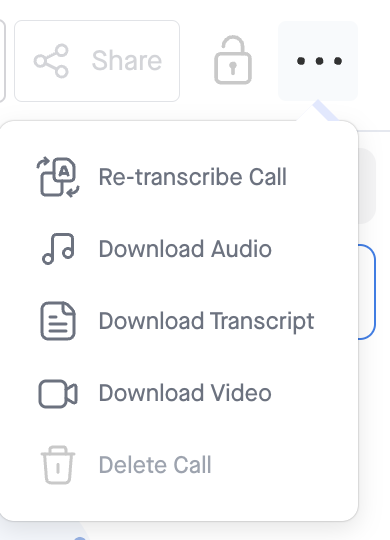
- Go to the call you want to re-transcribe and click the menu at the top right.
- Select Re-transcribe Call: