Moving People to a new step is very similar to skipping a step, but with a little more control. Moving People to a different step allows you to adjust their Cadence progression based on their individual needs or circumstances.
Say you take over a coworker's Lead assignments who have already been communicated with. Once you add them to your Cadence, they don't need to run through steps 1-5, so you can collectively move the People to step 6.
In this article, you will learn how to move People to a different Cadence step in Salesloft. This article includes:
For a quick review of how to move a person to a different cadence step, check out the video below:
You must have a Salesloft account.
To move People to a new Cadence step, follow these instructions:
- Access the Cadence People Tab: Go to the Cadences page in Salesloft. Select the Cadence containing the People you want to move. Click the People tab within the Cadence.
- Filter and Sort People (Optional): Use the filters and sorting options to refine the list of People if needed.
- Select People: Select the specific Person or multiple People you want to move to a different step.
- Open Cadence Actions: Click the Cadence Actions button (rocket ship icon).
- Select "Move to Step": Choose Move to Step from the dropdown menu. The "Move to Step" popup window will appear.
- Choose the Destination Step: Select the desired step from the dropdown menu in the popup window.
- Click "Move": Click the Move button to move the selected People to the chosen step.
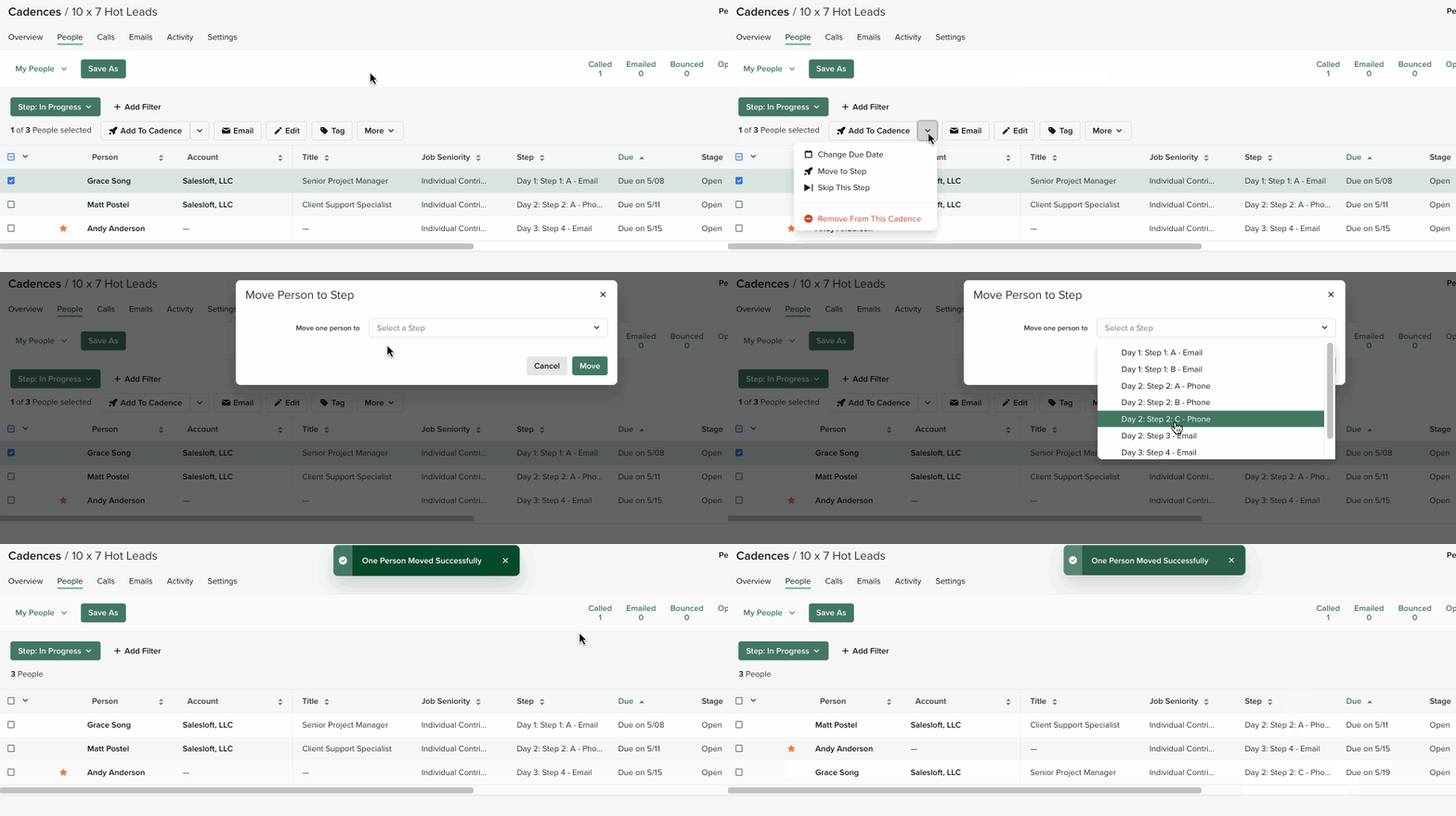
Figure 1 [GIF]: Move Person to a Different Cadence Step Example
People who have completed a cadence cannot be moved to a different step from within the cadence view. Per current product behavior, a person who has completed a cadence is not expected to re-enter that cadence from this location.
To re-enroll a completed contact in a cadence:
- Navigate to the People page (not the cadence's People tab).
- Search for the contact.
- Select Add to Cadence and choose the appropriate cadence and step.
Re-enrollment from the People page allows you to start the contact at any available step.
- Review your Cadences and identify situations where moving People to a different step might be beneficial.
- Use the "Move to Step" feature to customize your outreach and improve engagement with your prospects.
- Explore other Cadence management features in Salesloft to optimize your sales workflow.
