The Deals Pipeline View dashboards help you quickly surface the insights that matter most—like deal progression, stage velocity, or forecast coverage. But as your sales process evolves, your dashboards should too.
If you have created a Dashboard that may benefit one of more of your team members, you can edit the Sharing Settings to share the Dashboard with that user.
In this article, you’ll learn how to share dashboards from the Deals Pipeline View. This article includes:
- You can only edit Dashboards you’ve created or have been given permission to modify.
- Team members are based on Salesforce users associated with your team's Salesforce instance.
- Sharing settings are based on your team’s setup.
For a quick overview of how to share a Deals pipeline dashboard, check out this video:
If you created a dashboard that may benefit one or more of your team members, you can share the dashboard via the Sharing Settings.
Things to Note: Team members are based on Salesforce users associated with your team's Salesforce instance.
To edit the Sharing Settings of a Dashboard, follow these steps:
- Hover over the Workspace tab on the top navigation panel, then select Deals.
- Select the three vertical dots to the right of the Dashboard Title. The Dashboard Actions menu will appear.
- Click Edit Dashboard. This will open the Edit Dashboard menu.
- Select the Share with Teams dropdown, then check the box(es) beside the teams you would like to share the dashboard with. You can also click Everyone to share with your whole team.
- Hit Save.
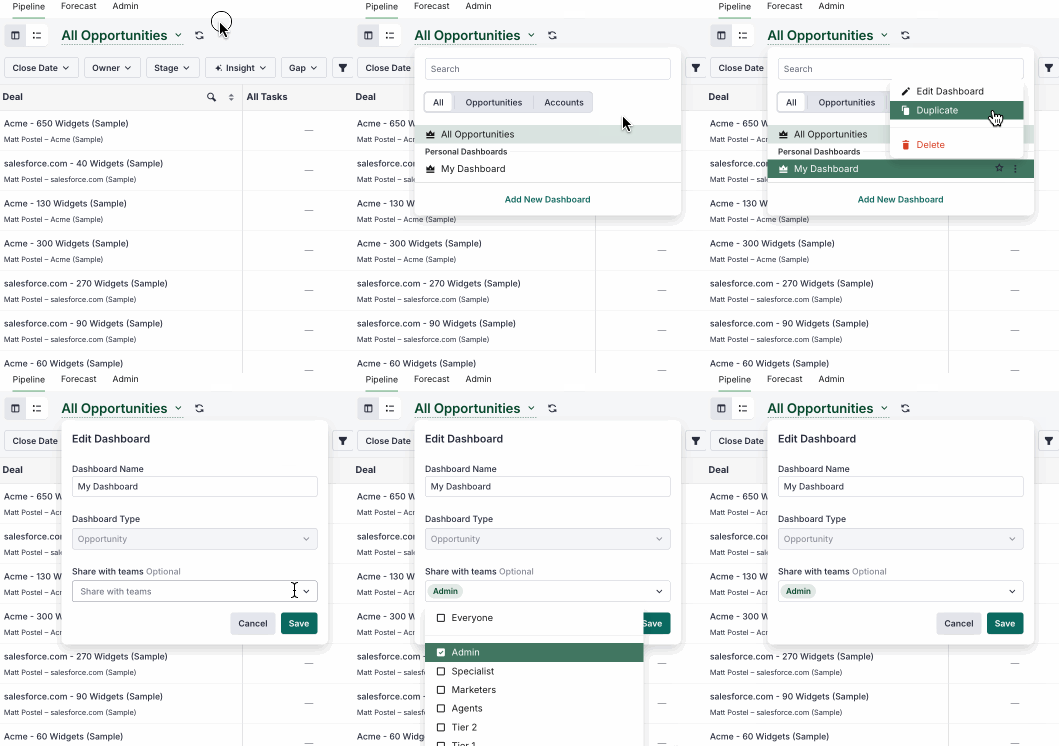
Figure 1: Share a Deals Pipeline Dashboard.
Sharing dashboards can help drive alignment across teams and improve deal execution. Here are some common instances when sharing a dashboard is helpful:
- With your manager: Share a dashboard that tracks renewal progression, forecast coverage, or stalled deals to align on where support is needed or to prep for 1:1s.
- With an account team: Share dashboards focused on multi-threading, account engagement, or next steps to keep everyone aligned on deal strategy.
- With new reps: Share dashboards you've built that highlight how you track pipeline hygiene or early indicators of risk, so new team members can ramp faster.
- With cross-functional partners: Share dashboards with RevOps or Customer Success to give visibility into handoff points or critical opportunity milestones.
