If you’re working from a shared or team-created Dashboard and want to personalize it—without rebuilding it from scratch—you can duplicate the existing Dashboard to your Personal Dashboards.
In this article, you will learn how to duplicate a Dashboard in the Pipeline View so you can create a customized version for personal use. This article includes:
Before duplicating a Dashboard:
- You must have permission to view the original Dashboard (Team or Shared Dashboard).
- Duplicating a Dashboard creates a new personal version; edits made to the duplicate do not affect the original.
For a quick overview of how to duplicate a Deals Pipeline Dashboard, check out this video:
To duplicate a Dashboard, follow these steps:
- Hover over the Workspace tab on the top navigation panel, then select Deals. You will land on the Pipeline tab.
- Click the All Opportunities dropdown. A dashboards dropdown will appear where you can see a list of available dashboards.
- Find the dashboard you would like to rename. You can scroll through the list or type the dashboard name into the search field.
- Hover over the dashboard title, then click the three vertical dots that appear. The Dashboard Actions menu will appear.
- Click Duplicate. This will open the Duplicate Dashboard window.
- In the Dashboard Title field, the existing name will appear with “(Copy)” appended. Edit the title if desired.
- Click the Dashboard Type dropdown and choose from the following options:
- (optional) Click the Share with Teams dropdown to choose who you would like to shared the copied dashboard with.
- Hit Save. The Dashboard will be saved to your Personal Dashboards list.
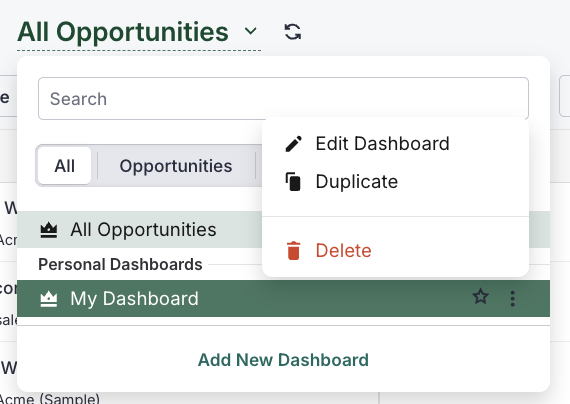
Figure 1: Duplicate a dashboard from the Deals Pipeline View.
- Duplicated Dashboards inherit all the filters and widgets from the original. You can then modify or remove them as needed.
- This is a helpful way to explore different visualizations or reporting structures without affecting the team version.
- Each duplicated Dashboard is fully editable and owned by you.
Ready to tailor your view even further?
