Salesloft’s Public IP addresses can be used to provide allowlist rules for access to internal or 3rd-party services.
This list was last updated as of November 17th, 2025.
In this article, we will cover the following:
Before you set allowlist domains, here are a few things you should know:
- The IPs listed in this article only apply to Salesloft. The IPs do not apply to Drift. For more information on Drift IPs, check out Drift Allowlist Domains and Public IP Address.
- IP addresses are assigned by region. The region is shown as "US1/2/3 etc." Reach out to your Salesloft customer service representative to learn which region your team is in.
- IP allowlisting for Salesloft is only necessary if your internal security policies restrict external connections based on trusted IP addresses. The most common scenarios requiring allowlisting are:
- Email Connection: If your organization uses an on-premises Exchange/SMTP server secured by a restrictive firewall, allowlisting is required for message delivery. Your IT team manages this by adding our IP addresses to your Email Security Gateway or Firewall Rules.
- Salesforce Connection: IP allowlisting is required if your Salesforce policies enforce IP restrictions. If the Salesloft Connected App's OAuth Policy is set to 'Enforce IP restrictions' (as shown below), your Salesforce Admin team must allowlist the IPs to ensure logins and data synchronization. No action is needed if the policy is set to 'Relax IP restrictions’. Configuration can be done at the Profile level (Login IP Ranges) or the Organization level (Network Access).
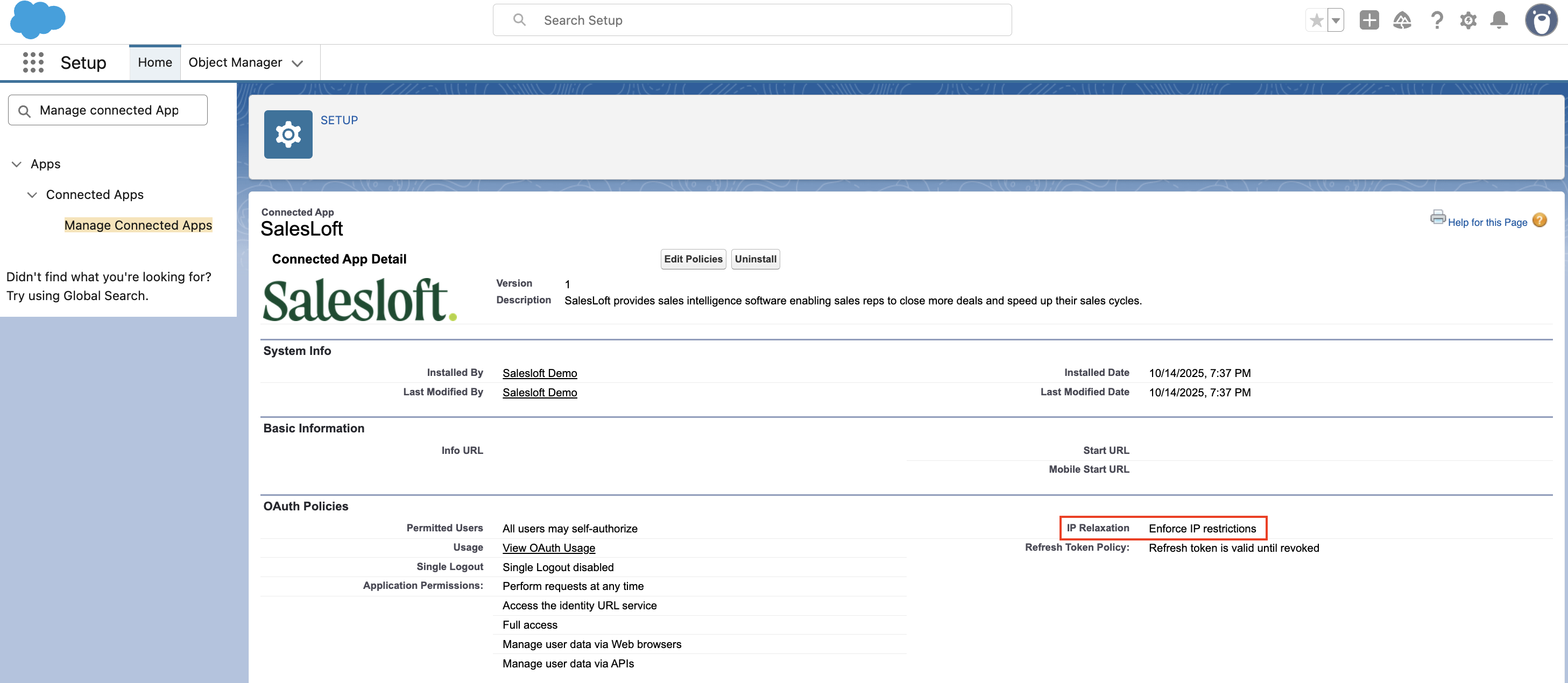
Figure 1: Salesforce Connection
To ensure seamless service and connectivity, please update your allowlist with the public IP addresses listed in the tables below.
Based on your region, allowlist the following IP addresses:
| IP Address |
| 54.163.237.178 |
| 54.163.244.247 |
| 54.243.159.114 |
| 54.243.159.120 |
| 54.243.159.132 |
| 54.243.159.165 |
| 54.83.32.223 |
| 54.83.32.240 |
| 54.83.33.2 |
| 54.83.33.82 |
| 54.83.33.106 |
| 107.22.242.218 |
| 34.48.90.9 |
| 34.85.229.117 |
| 34.11.43.15 |
| 34.145.166.121 |
| 34.48.228.151 |
| 35.194.79.254 |
| 34.55.215.225 |
| 34.57.153.165 |
| 136.113.45.246 |
| IP Address |
| 3.83.196.94 |
| 54.157.223.117 |
| 54.162.183.19 |
| 34.194.201.131 |
| 34.239.231.177 |
| 52.206.12.68 |
| 107.22.242.218 |
| 35.245.246.143 |
| 34.145.141.115 |
| 34.21.113.217 |
| 34.48.143.138 |
| 34.11.19.230 |
| 35.245.234.166 |
| 34.11.86.161 |
| 34.186.61.138 |
| 34.11.109.177 |
| IP Address |
| 35.184.122.213 |
| 35.184.14.189 |
| 34.122.59.142 |
| 35.238.47.176 |
| 34.72.181.122 |
| 35.222.231.218 |
| 34.123.195.217 |
| 34.69.86.124 |
| 35.223.7.9 |
| 34.68.73.86 |
| 35.226.90.187 |
| 34.123.60.84 |
| 107.22.242.218 |
| 34.121.231.254 |
| 35.232.238.202 |
| 34.58.187.154 |
| IP Address |
| 34.85.255.113 |
| 35.245.243.55 |
| 35.188.230.178 |
| 34.85.199.86 |
| 34.145.228.251 |
| 34.86.18.154 |
| 107.22.242.218 |
| 35.245.0.40 |
| 35.245.209.251 |
| 34.85.225.159 |
| IP Address |
| 34.141.56.47 |
| 34.107.108.77 |
| 34.141.48.141 |
| 34.141.112.65 |
| 34.141.87.177 |
| 35.198.78.18 |
| 34.89.131.63 |
| 34.107.85.19 |
| 34.107.73.182 |
| 34.141.29.152 |
| 34.89.146.49 |
| 34.89.194.249 |
| 3.64.133.92 |
| 52.28.78.15 |
| 18.156.130.45 |
The following IP addresses have been deprecated and decommissioned as of January 25, 2026. And can be removed from your allowlist.
| Region | IP Address |
| US1 | 54.163.237.178 |
| US1 | 54.163.244.247 |
| US1 | 54.243.159.114 |
| US1 | 54.243.159.120 |
| US1 | 54.243.159.132 |
| US1 | 54.243.159.165 |
| US1 | 54.83.32.223 |
| US1 | 54.83.32.240 |
| US1 | 54.83.33.2 |
| US1 | 54.83.33.82 |
| US1 | 54.83.33.106 |
| US1 | 107.22.242.218 |
| US2 | 3.83.196.94 |
| US2 | 54.157.223.117 |
| US2 | 54.162.183.19 |
| US2 | 34.194.201.131 |
| US2 | 34.239.231.177 |
| US2 | 52.206.12.68 |
| US2 | 107.22.242.218 |
| US3 | 107.22.242.218 |
| US4 | 107.22.242.218 |
| EU1 | 52.28.78.15 |
| EU1 | 18.156.130.45 |
| EU1 | 3.64.133.92 |
