The Drift for Salesforce app can be found in the Salesforce AppExchange and is free for Premium, Advanced and Enterprise Drift customers. Our managed package installs custom objects, with over 25 fields related to conversations in Drift which power reports and dashboards that we’ve pre-created for you. For Installation instructions please click on this link.
Note: Seeing a payment page but the Salesforce app is included in your Drift plan? We do not collect payment through app exchange, proceed with the "purchase" option to get to the installation page! You will not be charged if on the above plans!
How long does it take to install? Est 20 minutes!
Who may I need to install it? Salesforce Administrator or an admin level user
Why Install the Drift for Salesforce app?
Do you have established fields/values that you currently use to measure ROI? If so, you likely already have Salesforce reporting setup to keep track of these metrics. Our app is a powerful tool that allows you to include Drift in your existing reporting to account for your attribution model. Our reports give visibility into revenue sourced and influenced by Drift to contribute to your ROI model. All of these reports are accessible directly in Salesforce so you wouldn’t need to be inside of Drift to see ROI and anyone with those reporting permissions within Salesforce would have access.
What does the package come with?
We have precreated 9 reports and 6 dashboards powered by 2 Drift custom objects to showcase valuable metrics that contribute to overall pipeline including meetings booked via Drift, highest converting playbooks, and Drift influenced/sourced revenue. Below you will find a breakdown of each report and dashboard.
When installing a managed package, the custom apps, tabs and objects that it contains do NOT count against your Salesforce allocations
Reports
Revenue Reports:
1. Drift Pipeline (Accounts with Conversations) - See all opportunities created (year-to-date) with contacts who had Drift conversations. Then, drill down to see which teammates and playbooks are driving the most Pipeline. There are two versions of this report to dive into:
- Drift Pipeline | Accounts w/Convo (PB): Grouped by playbook
- Drift Pipeline |Accounts w/Convo (TM): Grouped by teammate
 2. Drift Revenue (Accounts with Convos) - Displays closed deals (year-to-date) with accounts who had Drift conversations.
3. Drift Pipeline (Contacts with Conversations) - Displays opportunities created year-to-date with contacts who had Drift conversations. This report is also has two reports grouped by playbook and teammate.
- Drift Pipeline | Contacts w/Convo (PB) Grouped by playbook
- Drift Pipeline | Contacts w/Convo (TM) Grouped by teammate
4. Drift Revenue | Contacts w/Convo - Displays closed deals (year-to-date) with contacts who had Drift conversations.
Drift Metric Reports
Drift Meetings - Displays meetings booked by Drift year-to-date. This report has two versions one grouped by playbook and the other grouped by meeting owner.
- Drift Meetings (By Playbook): Grouped by Playbook
- Drift Meetings (By Meeting Owner): Grouped by Meeting Owner
 2. Drift Conversations - Displays Drift conversations held year-to-date, grouped by month and teammate. Understand which reps are having more conversations (year-to-date), what playbooks are driving the most conversations, and more.
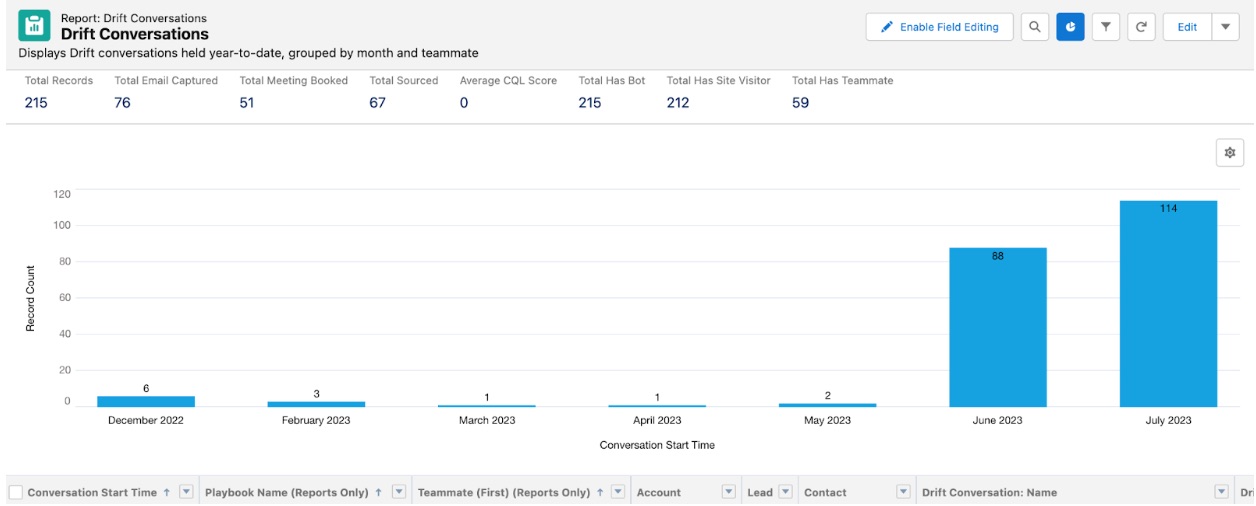 Note: These are not all of your Drift conversations. They are only the conversations that have been synced as Activity tasks to Salesforce based on your settings in Drift. Dashboards: 1. Drift Overview | Account-Level attribution - At a glance view of performance with Drift (year-to-date) across Conversations, Meetings, Pipeline, and Revenue.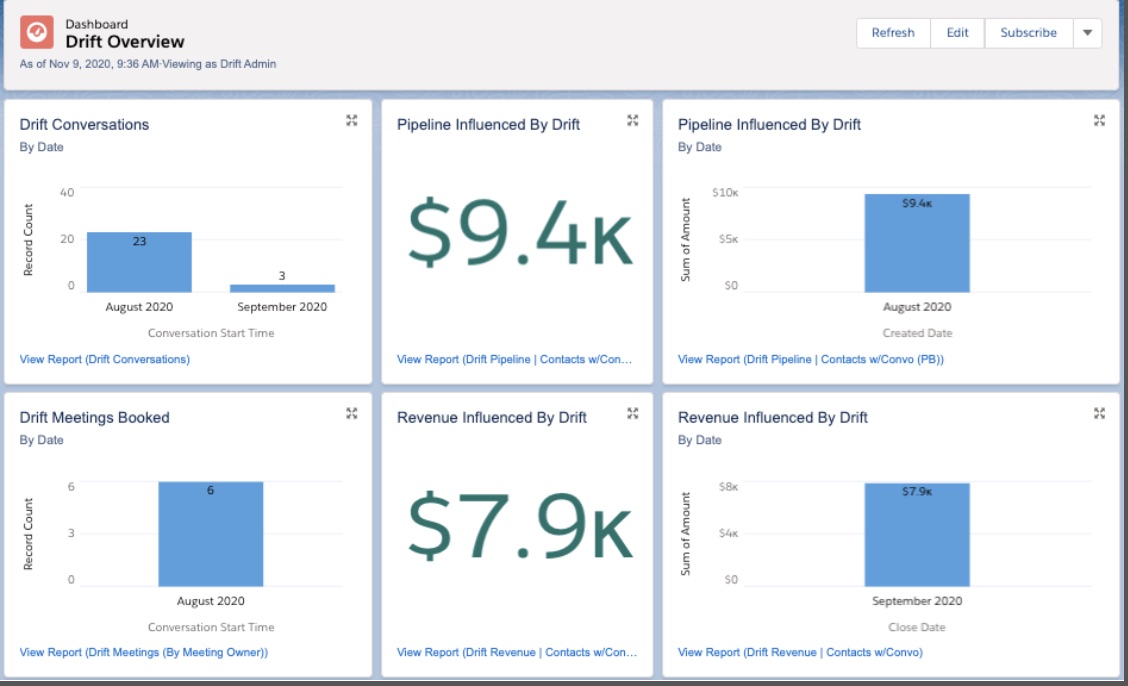
2. Drift Metrics (By Playbook) | Account-level Attribution - See how your top 10 playbooks are performing (year-to-date) across your funnel metrics. Drill down into each report for further information.
Note: Each component can count a single opportunity multiple times if the opportunity was related to conversations from more than one playbook
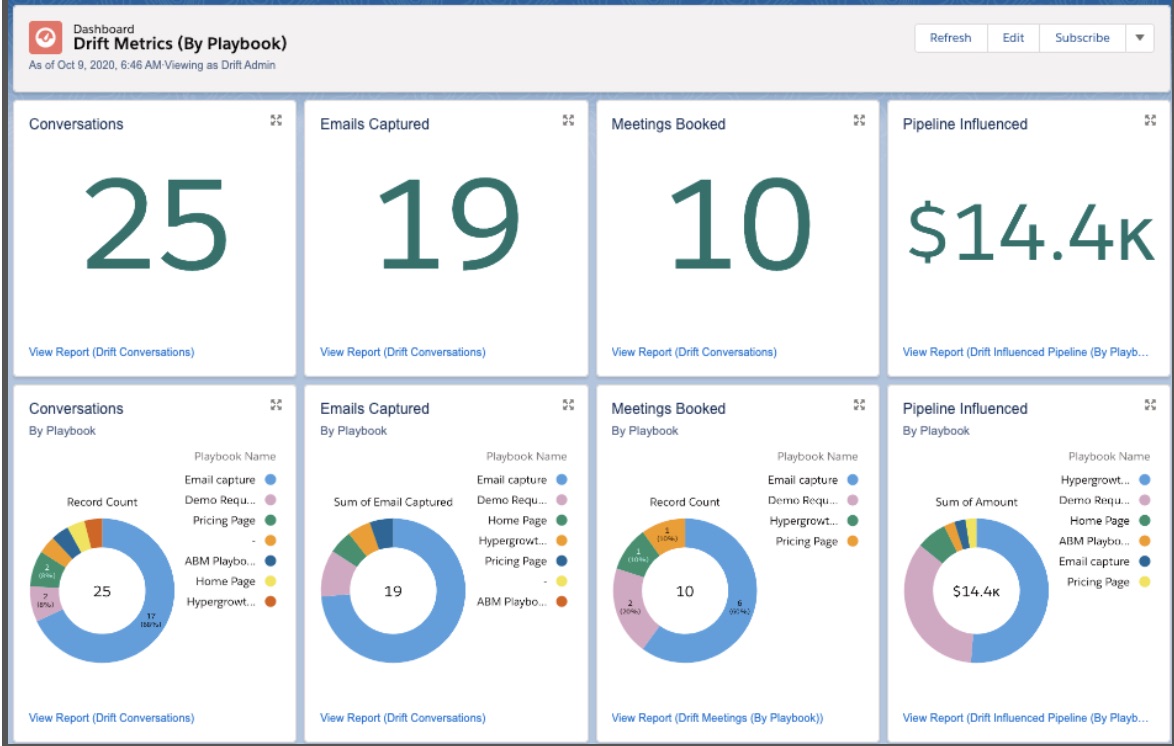
3. Drift Metrics (By Teammate) | Account-level Attribution - See how your top 10 reps are performing (year-to-date) across your funnel metrics. Drill down into each report for further information.
Note: Each component can count a single opportunity multiple times if the opportunity was related to conversations across multiple teammates.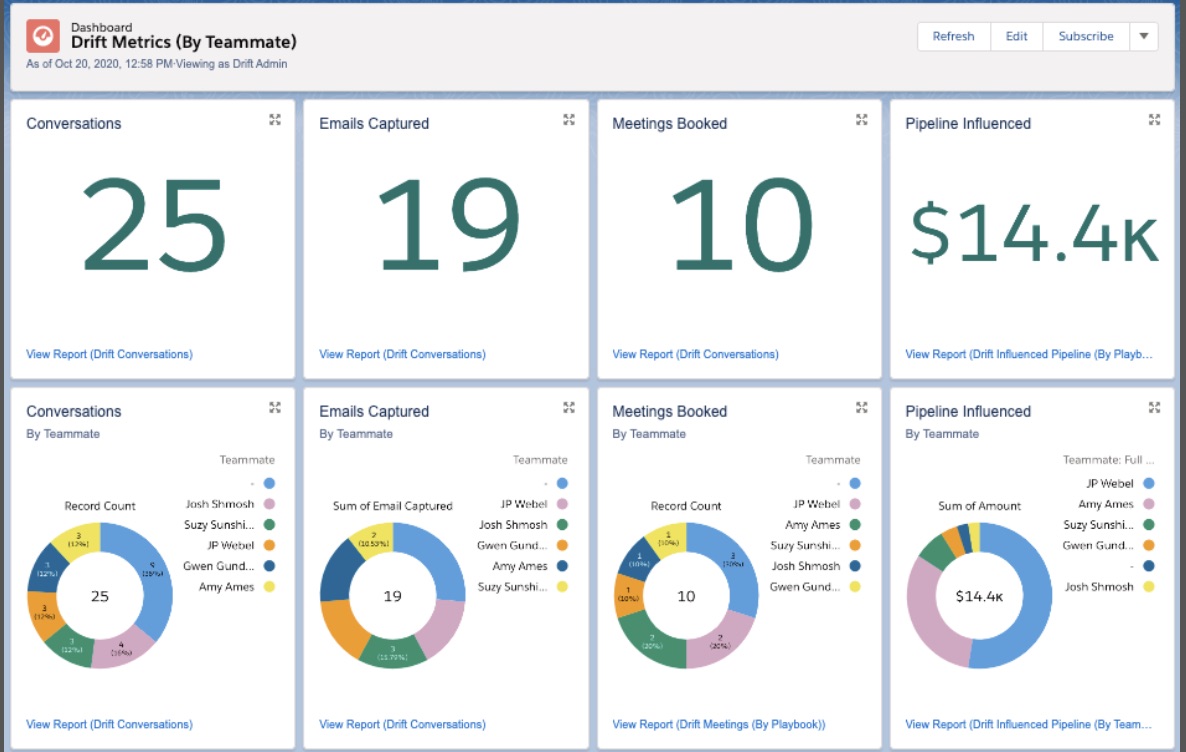
Additionally, there are 3 more dashboards
- Drift Overview
- Drift Metrics (By Playbook)
- Drift Metrics (By Teammate)
These metrics are similar to the above, but these are related to contact level reporting rather than the account.
